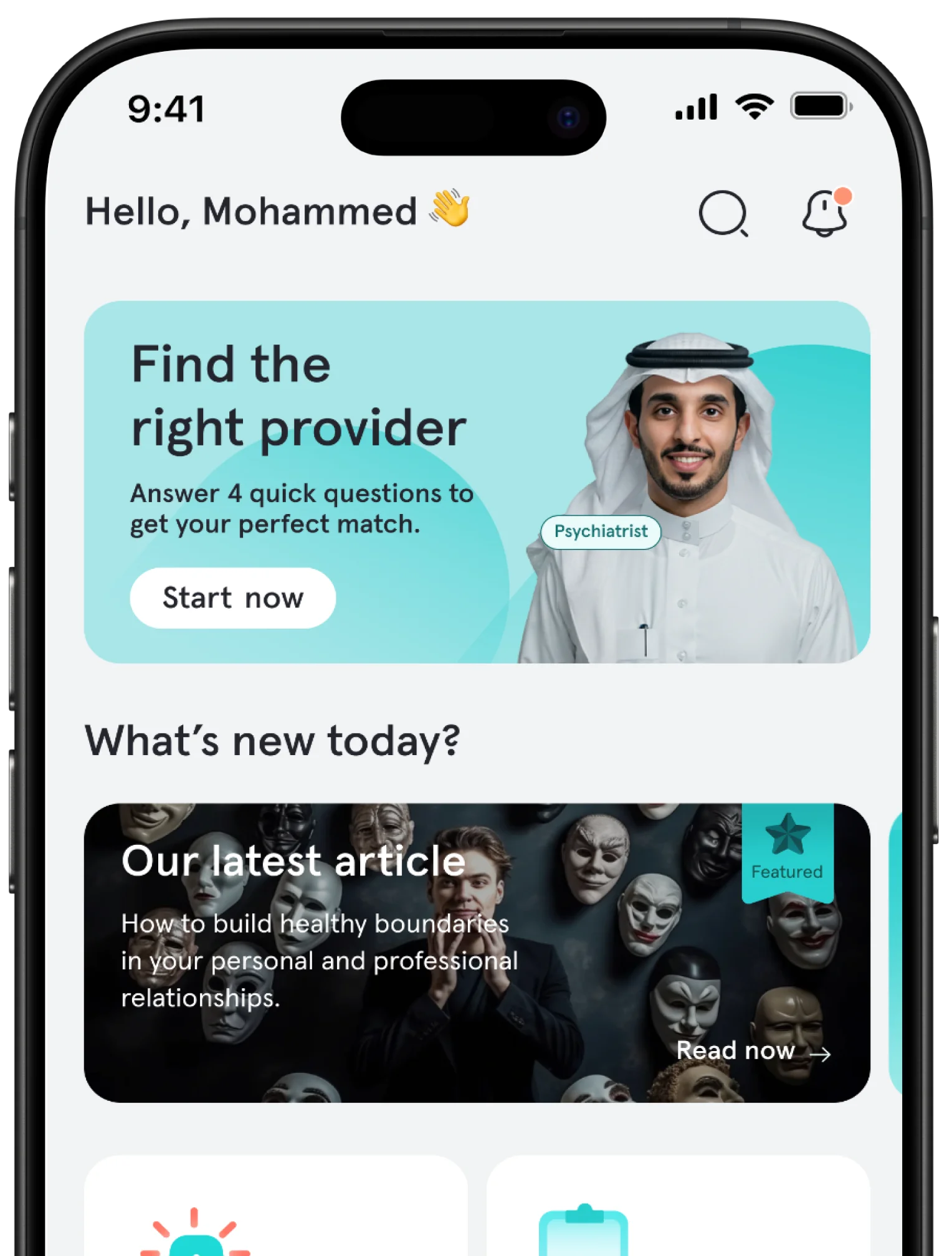
To book a session with a psychiatrist or psychologist through Tatmeen, the basic path is simple: download the app, register with your mobile number, search for the right specialist by name or based on what you feel, choose the appointment, session duration, and communication method, then confirm the booking and pay. After that, the appointment moves to the bookings page, where you can complete the pre-session steps and join the session from inside the app when the time comes.
What matters most is that Tatmeen does not assume you already know the specialist's name. You can browse first, search in natural language, enter through topic-based clinics, and use quick matching if you are unsure. That makes booking feel closer to a clear decision than a rushed guess that ends with an appointment that does not fit you.
Before You Start: What Do You Actually Need?
Practically, you need only three things: a mobile phone that can receive the verification code, an initial idea of what you want from the session, and a suitable payment method. If you are not ready to register immediately, the app allows guest browsing, but completing a booking requires creating an account and signing in with your mobile number and verification code.
1. Download the App and Sign In
Tatmeen is available on iOS and Android, and the main interface is in Arabic with English support. The journey starts by registering through your mobile number and SMS verification code. After that, you can complete your personal profile and medical profile gradually with details that may help the session later. This first step matters because it saves time before the appointment, especially if you want the specialist to begin with a clearer picture of your need.
2. Do Not Start with a Specialist's Name
This is one of Tatmeen's best entry points: you do not have to know from the beginning whether you want a specific person. You can search naturally with phrases like "I feel anxious" or "depression." You can also enter through topic-based clinics that group common needs into understandable paths, such as relationships and family, sleep disorders, and mental health at work. If you are even more unsure, quick matching inside the app asks a few short questions about your need, preferences, budget, and availability, then suggests a list closer to what may suit you.
This alone saves many users a long stretch of unhelpful comparison. Instead of starting with a name, start with what you feel or what you want to solve, then let the app narrow the options for you.
3. How Do You Choose Between a Psychiatrist and a Psychologist?
Inside Tatmeen, the professional role appears clearly in the care provider's profile. The provider page also explains that a doctor is the one who can issue a prescription when needed. So if your main need is medical evaluation, medication, or medication follow-up, it is usually better to start with a psychiatrist. If your main goal is a therapy session, understanding emotions and behavioral patterns, and working on anxiety, stress, relationships, or coping skills, then it is usually better to start with a psychologist. If you are not sure, do not delay the booking; use quick matching and then compare the results.
The nice part is that the app does not trap you in one choice. It lets you filter by professional role, language, price, appointment time, and type of problem, so you reach an option that is closer to what you actually need, not only what looks popular.
4. Read the Professional Profile as If You Are Choosing a Path, Not Just an Appointment
After narrowing the results, open the professional profile and read what truly matters. On Tatmeen, you can see the professional role, bio, years of experience, professional classification number, languages, session price, available session formats, subspecialties, ratings, and nearest appointments. These details are not decoration. They help you rule out an option that may look excellent on paper but does not fit you in practice, or discover a specialist who is very suitable for your problem but whom you might have skipped if you only looked at the name or photo.
A good decision here does not depend on rating alone. Also look at the session format the specialist offers, the language, the nearest available appointment, and the price compared with the session duration. That is how booking becomes a thoughtful choice rather than a rushed step that later ends in rescheduling.
5. Choose the Appointment, Duration, and Session Method
Once you settle on a specialist, the actual booking path begins inside the app: you choose an available appointment, then the session duration, then move to confirmation and payment. Tatmeen's terms state that prices appear before the request based on the duration you choose, such as 30, 45, or 60 minutes, and may differ from one specialist to another based on qualifications and experience. The app reference also states that session formats may be text, audio, or video depending on what the specialist offers.
This is where an important point appears: do not choose only the appointment time; choose the session format that fits you as well. Some users make their best start through writing, while others prefer audio or video from the first session. The quality of the beginning is often connected to your comfort with the communication method, not just how quickly you book.
6. Complete Payment and Confirm the Booking
After choosing the appointment and duration, you move to payment. Tatmeen's terms state that the session fee is paid at booking. The official website mentions support for payment methods such as mada, Visa, Mastercard, and Apple Pay, while the app reference also describes additional in-app methods such as American Express and flexible payment options like Tamara and Tabby, along with coupons and wallet balance when applicable. If you have a coupon or balance, this is the natural place to use it before confirming the booking.
Once confirmed, the appointment moves to the bookings page. This is where the stage many people ignore begins, even though it can genuinely improve the quality of the session.
7. Do Not Wait Until the Session Time to Do Everything
On the upcoming appointments page inside Tatmeen, you will find the basics: date, time, session type, duration, price, and booking number. But what matters more is what you can do before the appointment: complete requested assessments, update your medical profile, upload documents, review homework if there is any, and communicate with the specialist through the pre-session chat. This makes the actual session more direct and less likely to be consumed by introductory questions.
This is exactly where the difference appears between "I booked an appointment" and "I prepared well for the session." If you have previous reports, lab results, or notes you want the specialist to review, uploading them before the session saves valuable time during the appointment itself.
8. At the Appointment Time: Join the Session from Inside the App
At the start of the appointment, a Join Now button appears inside the app, and from there you enter the session room directly. According to the app reference, the room supports text chat with attachments and voice notes, as well as audio and video sessions depending on what the specialist offers. The same room may also be where you receive assessments, homework, reports, prescriptions, or lab and imaging requests when needed.
And after the session ends, the value does not disappear when the screen closes. You can return to the completed appointment to see the text record, view reports, prescriptions, or related requests, download the invoice, rate the specialist, and book again with the same provider if you want. That makes follow-up much easier than starting from zero every time.
If You Want the Nearest Possible Appointment Instead of a Scheduled One
Regular booking is not the only route. Tatmeen's official website mentions an urgent consultation option, and the app reference explains that instant sessions work by entering a quick summary of the problem in text, voice, or attachments, then routing the request to an available care provider. This path is suitable when your priority is fast access rather than choosing a specific name or a later appointment.
Three Mistakes That Make Booking Weaker Than It Should Be
The first mistake is searching for "the best specialist" before starting with what you need. On Tatmeen, searching by problem, feeling, or topic-based clinic is often more efficient than moving randomly between names. The second mistake is booking the first available appointment without reading the session format, language, price, and subspecialties. The third mistake is leaving assessments, medical profile updates, or document uploads until the last minute, even though the app is designed to help you prepare these steps before the session so you enter with a clearer picture.
Finally
Booking a session through Tatmeen is not technically complicated, but a good booking depends on two steps: starting from the right search entry point and reading the specialist profile intelligently before paying. After that, the rest of the journey is direct: choose the appointment, set the duration, confirm payment, prepare from the bookings page, and join from inside the app. If your problem today is confusion rather than unwillingness, start with one simple sentence describing what you feel inside Tatmeen; that is often the fastest way to reach the specialist most suitable for you.
Frequently Asked Questions
Do I need to know the specialist's name before booking?
No. You can search by specialist name if you know it, but the app also lets you search by what you feel, use topic-based clinics, or try quick matching if you are not sure what suits you best.
Can I browse before registering?
Yes. You can browse as a guest, but completing the booking itself requires creating an account with your mobile number and confirming it with a verification code.
When do I pay for the session?
Payment is made at booking. Prices also appear before the request based on the selected session duration, such as 30, 45, or 60 minutes, and may vary depending on the specialist and their experience.
Can I change or cancel the appointment?
Yes. The app reference explains that upcoming appointments can be rescheduled or canceled from the booking details. The terms also state that a full refund can be requested up to 6 hours before the session time.
What if the specialist is late or does not attend?
According to the app reference, there is a delay or absence detection mechanism that activates in-app options such as cancellation, rescheduling, or transfer, with compensation or wallet-credit logic applied when the conditions are met.
Do I need National ID verification before booking?
Not necessarily. The app reference explains that National ID verification is optional, used for billing and tax-exemption purposes only, and is not visible to care providers.
A writer and researcher specializing in psychiatry, she focuses on mental health and the human emotions we experience but cannot always find the words to name. She writes about us—about humanity and the human experience—and simplifies complex topics to offer content that helps us better understand ourselves and life, ultimately making us feel less alone.
Every Tatmeen article is reviewed by care providers licensed by the Saudi Commission for Health Specialties, so what you read is accurate and trustworthy.
This article builds understanding and does not replace a licensed care provider.
Need someone to talk to?
Tatmeen's licensed care providers are available around the clock, and the app's urgent consultation connects you with one within minutes.
Download Tatmeen to explore care providers and booking options.
Smart matchingFour quick questions suggest the right care provider
Urgent consultationTalk to an available care provider within minutes
Free psychological measuresMore than 20 tests to understand how you are doing
Scan to download
{"data":{"id":"499c21c0-52ac-403d-8772-472e8a9d53ac","slug":"book-mental-health-session-tatmeen-saudi-arabia","arTitle":"كيف تحجز جلسة مع طبيب أو أخصائي نفسي عبر تطبيق تطمين؟ دليل خطوة بخطوة","enTitle":"How to Book a Session with a Psychiatrist or Psychologist on Tatmeen in KSA","thumbnailAltText":"tatmeen booking guide","estimatedReadingTime":5,"likesCount":338,"writer":{"id":"3ab72b74-f26f-4337-9b47-3114b0f90de5","arBio":"كاتبة وباحثة متخصصة في مجال الطب النفسي، تهتم بموضوعات الصحة النفسية وبالمشاعر الإنسانية التي نختبرها ولا نجد دائمًا الكلمات لتسميتها. تكتب عنّا؛ عن الإنسان وتجربته، وتبسّط الموضوعات المعقّدة لتقدّم محتوى يساعدنا على فهم ذواتنا والحياة أكثر، ويجعلنا نشعر بأننا بوحدة أقل.","enBio":"A writer and researcher specializing in psychiatry, she focuses on mental health and the human emotions we experience but cannot always find the words to name. She writes about us—about humanity and the human experience—and simplifies complex topics to offer content that helps us better understand ourselves and life, ultimately making us feel less alone.","user":{"slug":"ayat-alnajar","arFullName":"آيات النجار","enFullName":"Ayat Al-Najjar","publicProfileImageUrl":"https://cdn.tatmeen.sa/public/profile-images/02384455-68fa-40b6-ad05-609fde65cafa/21b9a610dde5dfc6d37af110c23e9c7ab3946be080c281beb000debf4f7d31a6.webp","publicProfileImage96Url":"https://cdn.tatmeen.sa/public/profile-images/02384455-68fa-40b6-ad05-609fde65cafa/21b9a610dde5dfc6d37af110c23e9c7ab3946be080c281beb000debf4f7d31a6-w96.webp","publicProfileImage192Url":"https://cdn.tatmeen.sa/public/profile-images/02384455-68fa-40b6-ad05-609fde65cafa/21b9a610dde5dfc6d37af110c23e9c7ab3946be080c281beb000debf4f7d31a6-w192.webp"}},"arContent":"","enContent":"","productionDocument":{"headings":[{"id":"article-section-before-you-start-what-do-you-actually-need","text":"Before You Start: What Do You Actually Need?"},{"id":"article-section-1-download-the-app-and-sign-in","text":"1. Download the App and Sign In"},{"id":"article-section-2-do-not-start-with-a-specialist-s-name","text":"2. Do Not Start with a Specialist's Name"},{"id":"article-section-3-how-do-you-choose-between-a-psychiatrist-and-a-psychologist","text":"3. How Do You Choose Between a Psychiatrist and a Psychologist?"},{"id":"article-section-4-read-the-professional-profile-as-if-you-are-choosing-a-path-not-just-an-appointment","text":"4. Read the Professional Profile as If You Are Choosing a Path, Not Just an Appointment"},{"id":"article-section-5-choose-the-appointment-duration-and-session-method","text":"5. Choose the Appointment, Duration, and Session Method"},{"id":"article-section-6-complete-payment-and-confirm-the-booking","text":"6. Complete Payment and Confirm the Booking"},{"id":"article-section-7-do-not-wait-until-the-session-time-to-do-everything","text":"7. Do Not Wait Until the Session Time to Do Everything"},{"id":"article-section-8-at-the-appointment-time-join-the-session-from-inside-the-app","text":"8. At the Appointment Time: Join the Session from Inside the App"},{"id":"article-section-if-you-want-the-nearest-possible-appointment-instead-of-a-scheduled-one","text":"If You Want the Nearest Possible Appointment Instead of a Scheduled One"},{"id":"article-section-three-mistakes-that-make-booking-weaker-than-it-should-be","text":"Three Mistakes That Make Booking Weaker Than It Should Be"},{"id":"article-section-finally","text":"Finally"},{"id":"article-section-frequently-asked-questions","text":"Frequently Asked Questions"}],"faqs":[],"beforeSourcesHtml":"","sources":[{"title":"Saudi Ministry of Health - Telemedicine","href":"https://www.moh.gov.sa/en/Ministry/Information-and-services/Pages/Telemedicine.aspx","hostname":"moh.gov.sa"},{"title":"Saudi Ministry of Health - Seha Virtual Hospital","href":"https://www.moh.gov.sa/en/Ministry/Projects/Pages/Seha-Virtual-Hospital.aspx","hostname":"moh.gov.sa"},{"title":"Saudi Ministry of Health - Legal Regulations for Telehealth Services","href":"https://www.moh.gov.sa/en/Ministry/Rules/Documents/Legal-Regulations-for-Telehealth-Services.pdf","hostname":"moh.gov.sa"},{"title":"Saudi Commission for Health Specialties - Professional Classification","href":"https://scfhs.org.sa/en/classification-professional-from-inside-outside-kingdom-","hostname":"scfhs.org.sa"},{"title":"Saudi Commission for Health Specialties - Professional Registration","href":"https://scfhs.org.sa/en/professional-registration-requirements","hostname":"scfhs.org.sa"},{"title":"HHS Telehealth - How do I schedule a telehealth appointment?","href":"https://telehealth.hhs.gov/patients/how-do-i-schedule-telehealth-appointment","hostname":"telehealth.hhs.gov"},{"title":"HHS Telehealth - Telehealth and Behavioral Health","href":"https://telehealth.hhs.gov/patients/additional-resources/telehealth-and-behavioral-health","hostname":"telehealth.hhs.gov"},{"title":"National Institute of Mental Health - Getting Mental Health Support Virtually","href":"https://www.nimh.nih.gov/health/publications/what-is-telemental-health","hostname":"nimh.nih.gov"}],"afterSourcesHtml":"<p><br /></p>","blocks":[{"type":"html","html":"<p><span style=\"color:#000000\">To book a session with a psychiatrist or psychologist through Tatmeen, the basic path is simple: download the app, register with your mobile number, search for the right specialist by name or based on what you feel, choose the appointment, session duration, and communication method, then confirm the booking and pay. After that, the appointment moves to the bookings page, where you can complete the pre-session steps and join the session from inside the app when the time comes.</span></p><p><span style=\"color:#000000\">What matters most is that Tatmeen does not assume you already know the specialist's name. You can browse first, search in natural language, enter through topic-based clinics, and use quick matching if you are unsure. That makes booking feel closer to a clear decision than a rushed guess that ends with an appointment that does not fit you.</span></p><h2 id=\"article-section-before-you-start-what-do-you-actually-need\" data-toc-heading tabindex=\"-1\"><span id=\"before-you-start-what-do-you-actually-need-1\" aria-hidden=\"true\"></span><span style=\"color:#000000\"><strong>Before You Start: What Do You Actually Need?</strong></span></h2><p><span style=\"color:#000000\">Practically, you need only three things: a mobile phone that can receive the verification code, an initial idea of what you want from the session, and a suitable payment method. If you are not ready to register immediately, the app allows guest browsing, but completing a booking requires creating an account and signing in with your mobile number and verification code.</span></p><h2 id=\"article-section-1-download-the-app-and-sign-in\" data-toc-heading tabindex=\"-1\"><span id=\"1-download-the-app-and-sign-in-2\" aria-hidden=\"true\"></span><span style=\"color:#000000\"><strong>1. Download the App and Sign In</strong></span></h2><p><span style=\"color:#000000\">Tatmeen is available on iOS and Android, and the main interface is in Arabic with English support. The journey starts by registering through your mobile number and SMS verification code. After that, you can complete your personal profile and medical profile gradually with details that may help the session later. This first step matters because it saves time before the appointment, especially if you want the specialist to begin with a clearer picture of your need.</span></p><h2 id=\"article-section-2-do-not-start-with-a-specialist-s-name\" data-toc-heading tabindex=\"-1\"><span id=\"2-do-not-start-with-a-specialist-s-name-3\" aria-hidden=\"true\"></span><span style=\"color:#000000\"><strong>2. Do Not Start with a Specialist's Name</strong></span></h2><p><span style=\"color:#000000\">This is one of Tatmeen's best entry points: you do not have to know from the beginning whether you want a specific person. You can search naturally with phrases like \"I feel anxious\" or \"depression.\" You can also enter through topic-based clinics that group common needs into understandable paths, such as relationships and family, sleep disorders, and mental health at work. If you are even more unsure, quick matching inside the app asks a few short questions about your need, preferences, budget, and availability, then suggests a list closer to what may suit you.</span></p><p><span style=\"color:#000000\">This alone saves many users a long stretch of unhelpful comparison. Instead of starting with a name, start with what you feel or what you want to solve, then let the app narrow the options for you.</span></p><h2 id=\"article-section-3-how-do-you-choose-between-a-psychiatrist-and-a-psychologist\" data-toc-heading tabindex=\"-1\"><span id=\"3-how-do-you-choose-between-a-psychiatrist-and-a-psychologist-4\" aria-hidden=\"true\"></span><span style=\"color:#000000\"><strong>3. How Do You Choose Between a Psychiatrist and a Psychologist?</strong></span></h2><p><span style=\"color:#000000\">Inside Tatmeen, the professional role appears clearly in the care provider's profile. The provider page also explains that a doctor is the one who can issue a prescription when needed. So if your main need is medical evaluation, medication, or medication follow-up, it is usually better to start with a psychiatrist. If your main goal is a therapy session, understanding emotions and behavioral patterns, and working on anxiety, stress, relationships, or coping skills, then it is usually better to start with a psychologist. If you are not sure, do not delay the booking; use quick matching and then compare the results.</span></p><p><span style=\"color:#000000\">The nice part is that the app does not trap you in one choice. It lets you filter by professional role, language, price, appointment time, and type of problem, so you reach an option that is closer to what you actually need, not only what looks popular.</span></p><h2 id=\"article-section-4-read-the-professional-profile-as-if-you-are-choosing-a-path-not-just-an-appointment\" data-toc-heading tabindex=\"-1\"><span id=\"4-read-the-professional-profile-as-if-you-are-choosing-a-path-not-just-an-appointment-5\" aria-hidden=\"true\"></span><span style=\"color:#000000\"><strong>4. Read the Professional Profile as If You Are Choosing a Path, Not Just an Appointment</strong></span></h2><p><span style=\"color:#000000\">After narrowing the results, open the professional profile and read what truly matters. On Tatmeen, you can see the professional role, bio, years of experience, professional classification number, languages, session price, available session formats, subspecialties, ratings, and nearest appointments. These details are not decoration. They help you rule out an option that may look excellent on paper but does not fit you in practice, or discover a specialist who is very suitable for your problem but whom you might have skipped if you only looked at the name or photo.</span></p><p><span style=\"color:#000000\">A good decision here does not depend on rating alone. Also look at the session format the specialist offers, the language, the nearest available appointment, and the price compared with the session duration. That is how booking becomes a thoughtful choice rather than a rushed step that later ends in rescheduling.</span></p><h2 id=\"article-section-5-choose-the-appointment-duration-and-session-method\" data-toc-heading tabindex=\"-1\"><span id=\"5-choose-the-appointment-duration-and-session-method-6\" aria-hidden=\"true\"></span><span style=\"color:#000000\"><strong>5. Choose the Appointment, Duration, and Session Method</strong></span></h2><p><span style=\"color:#000000\">Once you settle on a specialist, the actual booking path begins inside the app: you choose an available appointment, then the session duration, then move to confirmation and payment. Tatmeen's terms state that prices appear before the request based on the duration you choose, such as 30, 45, or 60 minutes, and may differ from one specialist to another based on qualifications and experience. The app reference also states that session formats may be text, audio, or video depending on what the specialist offers.</span></p><p><span style=\"color:#000000\">This is where an important point appears: do not choose only the appointment time; choose the session format that fits you as well. Some users make their best start through writing, while others prefer audio or video from the first session. The quality of the beginning is often connected to your comfort with the communication method, not just how quickly you book.</span></p><h2 id=\"article-section-6-complete-payment-and-confirm-the-booking\" data-toc-heading tabindex=\"-1\"><span id=\"6-complete-payment-and-confirm-the-booking-7\" aria-hidden=\"true\"></span><span style=\"color:#000000\"><strong>6. Complete Payment and Confirm the Booking</strong></span></h2><p><span style=\"color:#000000\">After choosing the appointment and duration, you move to payment. Tatmeen's terms state that the session fee is paid at booking. The official website mentions support for payment methods such as mada, Visa, Mastercard, and Apple Pay, while the app reference also describes additional in-app methods such as American Express and flexible payment options like Tamara and Tabby, along with coupons and wallet balance when applicable. If you have a coupon or balance, this is the natural place to use it before confirming the booking.</span></p><p><span style=\"color:#000000\">Once confirmed, the appointment moves to the bookings page. This is where the stage many people ignore begins, even though it can genuinely improve the quality of the session.</span></p><h2 id=\"article-section-7-do-not-wait-until-the-session-time-to-do-everything\" data-toc-heading tabindex=\"-1\"><span id=\"7-do-not-wait-until-the-session-time-to-do-everything-8\" aria-hidden=\"true\"></span><span style=\"color:#000000\"><strong>7. Do Not Wait Until the Session Time to Do Everything</strong></span></h2><p><span style=\"color:#000000\">On the upcoming appointments page inside Tatmeen, you will find the basics: date, time, session type, duration, price, and booking number. But what matters more is what you can do before the appointment: complete requested assessments, update your medical profile, upload documents, review homework if there is any, and communicate with the specialist through the pre-session chat. This makes the actual session more direct and less likely to be consumed by introductory questions.</span></p><p><span style=\"color:#000000\">This is exactly where the difference appears between \"I booked an appointment\" and \"I prepared well for the session.\" If you have previous reports, lab results, or notes you want the specialist to review, uploading them before the session saves valuable time during the appointment itself.</span></p><h2 id=\"article-section-8-at-the-appointment-time-join-the-session-from-inside-the-app\" data-toc-heading tabindex=\"-1\"><span id=\"8-at-the-appointment-time-join-the-session-from-inside-the-app-9\" aria-hidden=\"true\"></span><span style=\"color:#000000\"><strong>8. At the Appointment Time: Join the Session from Inside the App</strong></span></h2><p><span style=\"color:#000000\">At the start of the appointment, a Join Now button appears inside the app, and from there you enter the session room directly. According to the app reference, the room supports text chat with attachments and voice notes, as well as audio and video sessions depending on what the specialist offers. The same room may also be where you receive assessments, homework, reports, prescriptions, or lab and imaging requests when needed.</span></p><p><span style=\"color:#000000\">And after the session ends, the value does not disappear when the screen closes. You can return to the completed appointment to see the text record, view reports, prescriptions, or related requests, download the invoice, rate the specialist, and book again with the same provider if you want. That makes follow-up much easier than starting from zero every time.</span></p><h2 id=\"article-section-if-you-want-the-nearest-possible-appointment-instead-of-a-scheduled-one\" data-toc-heading tabindex=\"-1\"><span id=\"if-you-want-the-nearest-possible-appointment-instead-of-a-scheduled-one-10\" aria-hidden=\"true\"></span><span style=\"color:#000000\"><strong>If You Want the Nearest Possible Appointment Instead of a Scheduled One</strong></span></h2><p><span style=\"color:#000000\">Regular booking is not the only route. Tatmeen's official website mentions an urgent consultation option, and the app reference explains that instant sessions work by entering a quick summary of the problem in text, voice, or attachments, then routing the request to an available care provider. This path is suitable when your priority is fast access rather than choosing a specific name or a later appointment.</span></p><h2 id=\"article-section-three-mistakes-that-make-booking-weaker-than-it-should-be\" data-toc-heading tabindex=\"-1\"><span id=\"three-mistakes-that-make-booking-weaker-than-it-should-be-11\" aria-hidden=\"true\"></span><span style=\"color:#000000\"><strong>Three Mistakes That Make Booking Weaker Than It Should Be</strong></span></h2><p><span style=\"color:#000000\">The first mistake is searching for \"the best specialist\" before starting with what you need. On Tatmeen, searching by problem, feeling, or topic-based clinic is often more efficient than moving randomly between names. The second mistake is booking the first available appointment without reading the session format, language, price, and subspecialties. The third mistake is leaving assessments, medical profile updates, or document uploads until the last minute, even though the app is designed to help you prepare these steps before the session so you enter with a clearer picture.</span></p><h2 id=\"article-section-finally\" data-toc-heading tabindex=\"-1\"><span id=\"finally-12\" aria-hidden=\"true\"></span><span style=\"color:#000000\"><strong>Finally</strong></span></h2><p><span style=\"color:#000000\">Booking a session through Tatmeen is not technically complicated, but a good booking depends on two steps: starting from the right search entry point and reading the specialist profile intelligently before paying. After that, the rest of the journey is direct: choose the appointment, set the duration, confirm payment, prepare from the bookings page, and join from inside the app. If your problem today is confusion rather than unwillingness, start with one simple sentence describing what you feel inside Tatmeen; that is often the fastest way to reach the specialist most suitable for you.</span></p><h2 id=\"article-section-frequently-asked-questions\" data-toc-heading tabindex=\"-1\"><span id=\"frequently-asked-questions-13\" aria-hidden=\"true\"></span><span style=\"color:#000000\"><strong>Frequently Asked Questions</strong></span></h2><p><span style=\"color:#000000\"><strong>Do I need to know the specialist's name before booking?</strong></span></p><p><span style=\"color:#000000\">No. You can search by specialist name if you know it, but the app also lets you search by what you feel, use topic-based clinics, or try quick matching if you are not sure what suits you best.</span></p><p><span style=\"color:#000000\"><strong>Can I browse before registering?</strong></span></p><p><span style=\"color:#000000\">Yes. You can browse as a guest, but completing the booking itself requires creating an account with your mobile number and confirming it with a verification code.</span></p><p><span style=\"color:#000000\"><strong>When do I pay for the session?</strong></span></p><p><span style=\"color:#000000\">Payment is made at booking. Prices also appear before the request based on the selected session duration, such as 30, 45, or 60 minutes, and may vary depending on the specialist and their experience.</span></p><p><span style=\"color:#000000\"><strong>Can I change or cancel the appointment?</strong></span></p><p><span style=\"color:#000000\">Yes. The app reference explains that upcoming appointments can be rescheduled or canceled from the booking details. The terms also state that a full refund can be requested up to 6 hours before the session time.</span></p><p><span style=\"color:#000000\"><strong>What if the specialist is late or does not attend?</strong></span></p><p><span style=\"color:#000000\">According to the app reference, there is a delay or absence detection mechanism that activates in-app options such as cancellation, rescheduling, or transfer, with compensation or wallet-credit logic applied when the conditions are met.</span></p><p><span style=\"color:#000000\"><strong>Do I need National ID verification before booking?</strong></span></p><p><span style=\"color:#000000\">Not necessarily. The app reference explains that National ID verification is optional, used for billing and tax-exemption purposes only, and is not visible to care providers.</span></p>"}],"inlineCtaSignatures":[],"_experienceAliases":{"v":1,"fields":["html","bodyHtml"]}},"createdAt":"2026-05-16T21:00:00.000Z","updatedAt":"2026-06-24T23:50:12.289Z","disorderGroups":[{"id":"1e82772d-a1a7-4d29-b475-be9d6b67ae02","slug":"common-mental-issues","arName":"اضطرابات نفسية شائعة","enName":"Common Mental Issues"}],"reviewer":{"arFullName":"فريق تطمين","enFullName":"Tatmeen team","slug":"tatmeen-team","kind":"organization"},"productionArticle":true,"promotionAllowed":true,"preparedCover":{"src":"https://cdn.tatmeen.sa/public/article-lcp/article-lcp-v2/sha256-feffb411c0a5e27e6f32eba3793c5f6949d8cec36ddf444b606ab2e8a3a03558/800-48752864e13b81751c351acf7d8399e6509eb6e956fc748284f6443ea9273906.avif","fallback":"https://cdn.tatmeen.sa/public/article-lcp/article-lcp-v2/sha256-feffb411c0a5e27e6f32eba3793c5f6949d8cec36ddf444b606ab2e8a3a03558/800-768fb83adb2ce9e6c6568f5ae7ad9d5b5410724cc5e86f94feacb51ee24f166c.webp","directUrl":"https://cdn.tatmeen.sa/blog-cover/Tatmeen-1778980511700.webp","isGolden":true,"avifSrcset":"https://cdn.tatmeen.sa/public/article-lcp/article-lcp-v2/sha256-feffb411c0a5e27e6f32eba3793c5f6949d8cec36ddf444b606ab2e8a3a03558/400-09646c2d356f6bc0bb8fbab8c1afd60fc2287fd49c29cec74fc85e03a37da9a6.avif 400w, https://cdn.tatmeen.sa/public/article-lcp/article-lcp-v2/sha256-feffb411c0a5e27e6f32eba3793c5f6949d8cec36ddf444b606ab2e8a3a03558/640-52e49ad4a7509e4728fa18fe549ebae0adb2e35f6243dd1b3b89a6777aedba24.avif 640w, https://cdn.tatmeen.sa/public/article-lcp/article-lcp-v2/sha256-feffb411c0a5e27e6f32eba3793c5f6949d8cec36ddf444b606ab2e8a3a03558/800-48752864e13b81751c351acf7d8399e6509eb6e956fc748284f6443ea9273906.avif 800w, https://cdn.tatmeen.sa/public/article-lcp/article-lcp-v2/sha256-feffb411c0a5e27e6f32eba3793c5f6949d8cec36ddf444b606ab2e8a3a03558/1200-5f2e59d7eb9b232893bf89a572053535019fd6c19a449443401571f55dd5bad0.avif 1200w","webpSrcset":"https://cdn.tatmeen.sa/public/article-lcp/article-lcp-v2/sha256-feffb411c0a5e27e6f32eba3793c5f6949d8cec36ddf444b606ab2e8a3a03558/400-ffe65889c0fc86a1ce5d057860d1d4e24fc0da62f40440d8f214e2cb2559217a.webp 400w, https://cdn.tatmeen.sa/public/article-lcp/article-lcp-v2/sha256-feffb411c0a5e27e6f32eba3793c5f6949d8cec36ddf444b606ab2e8a3a03558/640-faee10c7562ca391d750e1aee739ae3fe8c217c575566d0c91af7e922aa87d63.webp 640w, https://cdn.tatmeen.sa/public/article-lcp/article-lcp-v2/sha256-feffb411c0a5e27e6f32eba3793c5f6949d8cec36ddf444b606ab2e8a3a03558/800-768fb83adb2ce9e6c6568f5ae7ad9d5b5410724cc5e86f94feacb51ee24f166c.webp 800w, https://cdn.tatmeen.sa/public/article-lcp/article-lcp-v2/sha256-feffb411c0a5e27e6f32eba3793c5f6949d8cec36ddf444b606ab2e8a3a03558/1200-a1b0561a4308a7c6ce666801930f198f93c1e5353db268b045424b822d1c75e3.webp 1200w","phoneAvifSrcset":"https://cdn.tatmeen.sa/public/article-lcp/article-lcp-v2/sha256-feffb411c0a5e27e6f32eba3793c5f6949d8cec36ddf444b606ab2e8a3a03558/400-09646c2d356f6bc0bb8fbab8c1afd60fc2287fd49c29cec74fc85e03a37da9a6.avif 400w, https://cdn.tatmeen.sa/public/article-lcp/article-lcp-v2/sha256-feffb411c0a5e27e6f32eba3793c5f6949d8cec36ddf444b606ab2e8a3a03558/640-52e49ad4a7509e4728fa18fe549ebae0adb2e35f6243dd1b3b89a6777aedba24.avif 640w, https://cdn.tatmeen.sa/public/article-lcp/article-lcp-v2/sha256-feffb411c0a5e27e6f32eba3793c5f6949d8cec36ddf444b606ab2e8a3a03558/800-48752864e13b81751c351acf7d8399e6509eb6e956fc748284f6443ea9273906.avif 800w","phoneWebpSrcset":"https://cdn.tatmeen.sa/public/article-lcp/article-lcp-v2/sha256-feffb411c0a5e27e6f32eba3793c5f6949d8cec36ddf444b606ab2e8a3a03558/400-ffe65889c0fc86a1ce5d057860d1d4e24fc0da62f40440d8f214e2cb2559217a.webp 400w, https://cdn.tatmeen.sa/public/article-lcp/article-lcp-v2/sha256-feffb411c0a5e27e6f32eba3793c5f6949d8cec36ddf444b606ab2e8a3a03558/640-faee10c7562ca391d750e1aee739ae3fe8c217c575566d0c91af7e922aa87d63.webp 640w, https://cdn.tatmeen.sa/public/article-lcp/article-lcp-v2/sha256-feffb411c0a5e27e6f32eba3793c5f6949d8cec36ddf444b606ab2e8a3a03558/800-768fb83adb2ce9e6c6568f5ae7ad9d5b5410724cc5e86f94feacb51ee24f166c.webp 800w","width":800,"height":600},"previewTaxonomy":{"groups":[{"id":"1e82772d-a1a7-4d29-b475-be9d6b67ae02","slug":"common-mental-issues","arName":"اضطرابات نفسية شائعة","enName":"Common Mental Issues"}],"topics":[],"tags":[{"id":"0a7fb6ee-560f-4ee0-b5f5-a8af3b1bb1da","slug":"tatmeen","arName":"تطمين","enName":"Tatmeen"},{"id":"8f632a07-06ba-44f3-afe9-d7cef3e09698","slug":"product-howto","arName":"دليل المنتج / كيفية الاستخدام","enName":"Product Explainer / How-To-Use"},{"id":"300cd66c-9540-4ed3-8eae-47386be32d60","slug":"digital-health-telehealth","arName":"الصحة الرقمية والعلاج عن بُعد","enName":"Digital Health & Telehealth"}]},"previewProviderRecommendations":[{"id":"6866c238-0223-4d20-b182-6bf8929dccca","slug":"bushra-alluhaibi-4189","arFullName":"بشرى اللهيبي","enFullName":"Bushra Alluhaibi","publicProfileImageUrl":"","publicProfileImage96Url":"","publicProfileImage192Url":"","specialization":{"arName":"أخصائي نفسي","enName":"Psychologist"},"profileImageUrl":"","experienceYears":12,"consultantInfo":{"averageRating":{"average":0},"specialization":{"arGeneralName":"أخصائي نفسي","enGeneralName":"Psychologist"}}},{"id":"23ba62b8-9679-46a2-9439-b2801cafc59b","slug":"dr-mohammed-alanazi-4132","arFullName":"د. محمد العنزي","enFullName":"Dr. Mohammed ALANAZI","publicProfileImageUrl":"https://cdn.tatmeen.sa/public/profile-images/23ba62b8-9679-46a2-9439-b2801cafc59b/233e70d98cd910633553abf60e5ee8dd305797b64c4172746ab379f3b91a1461.webp","publicProfileImage96Url":"https://cdn.tatmeen.sa/public/profile-images/23ba62b8-9679-46a2-9439-b2801cafc59b/233e70d98cd910633553abf60e5ee8dd305797b64c4172746ab379f3b91a1461-w96.webp","publicProfileImage192Url":"https://cdn.tatmeen.sa/public/profile-images/23ba62b8-9679-46a2-9439-b2801cafc59b/233e70d98cd910633553abf60e5ee8dd305797b64c4172746ab379f3b91a1461-w192.webp","specialization":{"arName":"طبيب أسرة","enName":"Family Physician"},"profileImageUrl":"https://cdn.tatmeen.sa/public/profile-images/23ba62b8-9679-46a2-9439-b2801cafc59b/233e70d98cd910633553abf60e5ee8dd305797b64c4172746ab379f3b91a1461-w192.webp","experienceYears":3,"consultantInfo":{"averageRating":{"average":0},"specialization":{"arGeneralName":"طبيب أسرة","enGeneralName":"Family Physician"}}},{"id":"4bcf0531-d58c-4284-aeed-b2563c966ee3","slug":"dr-sultan-albalawi-9701","arFullName":"د. سلطان البلوي","enFullName":"Dr. Sultan Albalawi","publicProfileImageUrl":"https://cdn.tatmeen.sa/public/profile-images/4bcf0531-d58c-4284-aeed-b2563c966ee3/7038797eec8398a3d17eebf66394b26366409d9a9faece56515311203b0600b2.webp","publicProfileImage96Url":"https://cdn.tatmeen.sa/public/profile-images/4bcf0531-d58c-4284-aeed-b2563c966ee3/7038797eec8398a3d17eebf66394b26366409d9a9faece56515311203b0600b2-w96.webp","publicProfileImage192Url":"https://cdn.tatmeen.sa/public/profile-images/4bcf0531-d58c-4284-aeed-b2563c966ee3/7038797eec8398a3d17eebf66394b26366409d9a9faece56515311203b0600b2-w192.webp","specialization":{"arName":"طبيب أسرة","enName":"Family Physician"},"profileImageUrl":"https://cdn.tatmeen.sa/public/profile-images/4bcf0531-d58c-4284-aeed-b2563c966ee3/7038797eec8398a3d17eebf66394b26366409d9a9faece56515311203b0600b2-w192.webp","experienceYears":3,"consultantInfo":{"averageRating":{"average":0},"specialization":{"arGeneralName":"طبيب أسرة","enGeneralName":"Family Physician"}}}],"previewCareProviders":[{"id":"09364052-c2a9-4c52-9717-7ce2093b8d0a","slug":"kholoud-alharbi-5221","arFullName":"خلود الحربي","enFullName":"Kholoud Alharbi","publicProfileImageUrl":"https://cdn.tatmeen.sa/public/profile-images/09364052-c2a9-4c52-9717-7ce2093b8d0a/4a0aeb81619e351b77f4323e3605a0a00acc7ca3c82ee7cc5ca2c9e8ef716049.webp","publicProfileImage96Url":"https://cdn.tatmeen.sa/public/profile-images/09364052-c2a9-4c52-9717-7ce2093b8d0a/4a0aeb81619e351b77f4323e3605a0a00acc7ca3c82ee7cc5ca2c9e8ef716049-w96.webp","publicProfileImage192Url":"https://cdn.tatmeen.sa/public/profile-images/09364052-c2a9-4c52-9717-7ce2093b8d0a/4a0aeb81619e351b77f4323e3605a0a00acc7ca3c82ee7cc5ca2c9e8ef716049-w192.webp","gender":"FEMALE","specialization":{"arName":"أخصائي نفسي","enName":"Psychologist"}},{"id":"6f037535-1dca-4b50-a8b2-5974b7323286","slug":"salah-althobaiti-9053","arFullName":"صلاح الثبيتي","enFullName":"Salah Althobaiti","publicProfileImageUrl":"https://cdn.tatmeen.sa/public/profile-images/6f037535-1dca-4b50-a8b2-5974b7323286/35b6bd7fad9b1e004c1835803eb9c1b56dcacd380685ec8bff141f0fb888005c.webp","publicProfileImage96Url":"https://cdn.tatmeen.sa/public/profile-images/6f037535-1dca-4b50-a8b2-5974b7323286/35b6bd7fad9b1e004c1835803eb9c1b56dcacd380685ec8bff141f0fb888005c-w96.webp","publicProfileImage192Url":"https://cdn.tatmeen.sa/public/profile-images/6f037535-1dca-4b50-a8b2-5974b7323286/35b6bd7fad9b1e004c1835803eb9c1b56dcacd380685ec8bff141f0fb888005c-w192.webp","gender":"MALE","specialization":{"arName":"أخصائي نفسي","enName":"Psychologist"}},{"id":"3cc806e8-616b-4884-9f21-a75b378580a2","slug":"aisha-al-hashim-8667","arFullName":"عائشة ال هاشم","enFullName":"Aisha Al Hashim","publicProfileImageUrl":"https://cdn.tatmeen.sa/public/profile-images/3cc806e8-616b-4884-9f21-a75b378580a2/27f523d03be4dcfa1f6a79f70c1773887434e698990d214cd990caec56a44798.webp","publicProfileImage96Url":"https://cdn.tatmeen.sa/public/profile-images/3cc806e8-616b-4884-9f21-a75b378580a2/27f523d03be4dcfa1f6a79f70c1773887434e698990d214cd990caec56a44798-w96.webp","publicProfileImage192Url":"https://cdn.tatmeen.sa/public/profile-images/3cc806e8-616b-4884-9f21-a75b378580a2/27f523d03be4dcfa1f6a79f70c1773887434e698990d214cd990caec56a44798-w192.webp","gender":"FEMALE","specialization":{"arName":"أخصائي نفسي","enName":"Psychologist"}},{"id":"db2ce1a0-9325-4471-b7ce-eb2e811c30a3","slug":"amer-qutub-2441","arFullName":"عامر قطب","enFullName":"Amer Qutub","publicProfileImageUrl":"https://cdn.tatmeen.sa/public/profile-images/db2ce1a0-9325-4471-b7ce-eb2e811c30a3/80580f99bfd7fe2b2a9cf8eed73ab532f5086d1efe053b0aa57358c1ce004261.webp","publicProfileImage96Url":"https://cdn.tatmeen.sa/public/profile-images/db2ce1a0-9325-4471-b7ce-eb2e811c30a3/80580f99bfd7fe2b2a9cf8eed73ab532f5086d1efe053b0aa57358c1ce004261-w96.webp","publicProfileImage192Url":"https://cdn.tatmeen.sa/public/profile-images/db2ce1a0-9325-4471-b7ce-eb2e811c30a3/80580f99bfd7fe2b2a9cf8eed73ab532f5086d1efe053b0aa57358c1ce004261-w192.webp","gender":"MALE","specialization":{"arName":"أخصائي نفسي","enName":"Psychologist"}},{"id":"94765496-dbdf-4631-a01b-7df5f788668d","slug":"abdullrahman-alhamoudi-3045","arFullName":"عبدالرحمن الحمودي","enFullName":"Abdulrahman Alhamoudi","publicProfileImageUrl":"https://cdn.tatmeen.sa/public/profile-images/94765496-dbdf-4631-a01b-7df5f788668d/2d49f6b6493c564afb6f50b6c3634231dff3a5cf8353acfab393d1b2a88037d1.webp","publicProfileImage96Url":"https://cdn.tatmeen.sa/public/profile-images/94765496-dbdf-4631-a01b-7df5f788668d/2d49f6b6493c564afb6f50b6c3634231dff3a5cf8353acfab393d1b2a88037d1-w96.webp","publicProfileImage192Url":"https://cdn.tatmeen.sa/public/profile-images/94765496-dbdf-4631-a01b-7df5f788668d/2d49f6b6493c564afb6f50b6c3634231dff3a5cf8353acfab393d1b2a88037d1-w192.webp","gender":"MALE","specialization":{"arName":"أخصائي نفسي","enName":"Psychologist"}},{"id":"618dba89-5b70-4b46-8304-741b7ac8ecd3","slug":"abdullah-mari-1311","arFullName":"عبدالله مرعي","enFullName":"Abdullah Mari","publicProfileImageUrl":"https://cdn.tatmeen.sa/public/profile-images/618dba89-5b70-4b46-8304-741b7ac8ecd3/6b4a3bfb59f8a304ca79083b32859b46baad2e1d692974a47c02c1f66bd11129.webp","publicProfileImage96Url":"https://cdn.tatmeen.sa/public/profile-images/618dba89-5b70-4b46-8304-741b7ac8ecd3/6b4a3bfb59f8a304ca79083b32859b46baad2e1d692974a47c02c1f66bd11129-w96.webp","publicProfileImage192Url":"https://cdn.tatmeen.sa/public/profile-images/618dba89-5b70-4b46-8304-741b7ac8ecd3/6b4a3bfb59f8a304ca79083b32859b46baad2e1d692974a47c02c1f66bd11129-w192.webp","gender":"MALE","specialization":{"arName":"أخصائي نفسي","enName":"Psychologist"}},{"id":"3b50a5d5-e795-407f-8676-fd7f0e1bb7a0","slug":"abdulaziz-bin-hudayan-4940","arFullName":"عبدالعزيز بن هديان","enFullName":"Abdulaziz Bin Hudayan","publicProfileImageUrl":"https://cdn.tatmeen.sa/public/profile-images/3b50a5d5-e795-407f-8676-fd7f0e1bb7a0/710ff0fe1fb00cdb5042092e27b7910b480a439b02251ecded62d7758eefce95.webp","publicProfileImage96Url":"https://cdn.tatmeen.sa/public/profile-images/3b50a5d5-e795-407f-8676-fd7f0e1bb7a0/710ff0fe1fb00cdb5042092e27b7910b480a439b02251ecded62d7758eefce95-w96.webp","publicProfileImage192Url":"https://cdn.tatmeen.sa/public/profile-images/3b50a5d5-e795-407f-8676-fd7f0e1bb7a0/710ff0fe1fb00cdb5042092e27b7910b480a439b02251ecded62d7758eefce95-w192.webp","gender":"MALE","specialization":{"arName":"أخصائي نفسي","enName":"Psychologist"}}],"previewDownload":{"href":"/download","title":{"ar":"خطوة واحدة لأجلك، ابدأ الآن","en":"One step for you, start now"},"description":{"ar":"حمّل تطبيق تطمين لاستكشاف مقدمي الرعاية وخيارات الحجز.","en":"Download Tatmeen to explore care providers and booking options."},"posterSrc":"/images/home/cta-ar-new-1.webp","videoSrc":"/images/home/cta-ar-new-1.mp4","videoPosterSrc":"/images/home/cta-ar-new-1.webp","videoPosterEnSrc":"/images/home/cta-en-new-1.webp","videoType":"video/mp4","appStoreHref":"https://apps.apple.com/us/app/tatmeen-%D8%AA%D8%B7%D9%85%D9%8A%D9%86/id6473836983","googlePlayHref":"https://play.google.com/store/apps/details?id=com.TatmeenApp.user&hl=en"},"previewRelatedArticles":[{"id":"183c0c76-1f36-400c-bd02-3aab78bce145","slug":"Psychiatric-Illness-Relationship-to-Mental-illness","route":"/blog/Psychiatric-Illness-Relationship-to-Mental-illness/","title":{"ar":"المرض النفسي – علاج و أعراض وأسباب وعلاقته بالمرض العقلي","en":"Psychological Illness: Symptoms, Causes, Treatment, and Mental Illness"},"image":"https://cdn.tatmeen.sa/public/article-lcp/article-lcp-v2/sha256-d30fa57439910b10b1764f8d491e7b00f96927c57d556450e2935f7758c6ad2c/599-8567e6e62bfe8feb0ddbabbc46481b10da57eeb96d71424fa9b2612093f72d16.webp","directImageFallback":"https://cdn.tatmeen.sa/blog-cover/1706456221900-Tatmeen-20.jpg","arThumbnailAltText":"Seated figure with knees drawn up beneath a glowing brain graphic","thumbnailAltText":"Seated figure with knees drawn up beneath a glowing brain graphic","topic":{"label":{"ar":"اضطرابات نفسية شائعة","en":"Common Mental Issues"}},"readingTimeMinutes":5},{"id":"31fb0aba-6e63-4c2a-b5d9-28799c2bdf26","slug":"blue-horse-symbol-of-freedom-in-psychiatry","route":"/blog/blue-horse-symbol-of-freedom-in-psychiatry/","title":{"ar":"الحصان الأزرق في الطب النفسي: حكاية حرية تُسمَع","en":"The Blue Horse in Psychiatry: A Story of Freedom That Is Heard"},"image":"https://cdn.tatmeen.sa/public/article-lcp/article-lcp-v2/sha256-fb43250d88ae1ebe50bb2ad77ed28571e4329c72cac2312112cfd8439ea025b6/800-3e28077ef260db4606306174e079f501f1b1d12c8ea1cbcf4ed35beb1a2302dc.webp","directImageFallback":"https://cdn.tatmeen.sa/blog-cover/Tatmeen-1783194572797.webp","arThumbnailAltText":"Blue horse on cliff at sunset inside a woman's silhouette with birds flying over the sea","thumbnailAltText":"Blue horse on cliff at sunset inside a woman's silhouette with birds flying over the sea","topic":{"label":{"ar":"اضطرابات نفسية شائعة","en":"Common Mental Issues"}},"readingTimeMinutes":5},{"id":"cbe2e28d-11b9-4cbe-918f-0cc3b0d3a6ef","slug":"tatmeen-vision-2030-mental-health","route":"/blog/tatmeen-vision-2030-mental-health/","title":{"ar":"تجربة عربية محلية لمستقبل العلاج النفسي: لماذا ينسجم تطمين مع رؤية 2030؟","en":"A Local Arabic Experience for the Future of Mental Health Care: Why Tatmeen Fits"},"image":"https://cdn.tatmeen.sa/public/article-lcp/article-lcp-v2/sha256-0895b168ab817cd67296a1eb6a04d2121940b105ed1bc906c73bc268e0a8d0a0/800-9c829a653b5daec869e34a688770d05c262f1dfb8089fa4dd1109c0208c411f7.webp","directImageFallback":"https://cdn.tatmeen.sa/blog-cover/Tatmeen-1782319724380.webp","arThumbnailAltText":"Teal infographic with Tatmeen logo, connected icons, and Vision 2030 branding on gradient background","thumbnailAltText":"Teal infographic with Tatmeen logo, connected icons, and Vision 2030 branding on gradient background","topic":{"label":{"ar":"اضطرابات نفسية شائعة","en":"Common Mental Issues"}},"readingTimeMinutes":5},{"id":"1877b1fa-3fac-4ea5-93f8-93a09d2fd0d2","slug":"Psychotropic-medications-When-and-how-effective","route":"/blog/Psychotropic-medications-When-and-how-effective/","title":{"ar":"متى يلجأ الأطباء لاستخدام الأدوية النفسية وما مدى فعاليتها؟","en":"When Doctors Use Psychiatric Medications and How Effective They Are"},"image":"https://cdn.tatmeen.sa/public/article-lcp/article-lcp-v2/sha256-93b936f688f728ffa408883ceff6160beadcd0497cf83086ead369aabe678f14/600-c5d46d2fd977dd41ad05fcc192e5602f9f505843afd553d73585f1a71a72c304.webp","directImageFallback":"https://cdn.tatmeen.sa/blog-cover/1704729572625-Tatmeen-img-304","arThumbnailAltText":"Person writing on a form attached to a clipboard","thumbnailAltText":"Person writing on a form attached to a clipboard","topic":{"label":{"ar":"اضطرابات نفسية شائعة","en":"Common Mental Issues"}},"readingTimeMinutes":5}],"previewRelatedReadStates":{}},"locale":"en","device":"desktop","path":"/en/blog/book-mental-health-session-tatmeen-saudi-arabia/","readingControls":false,"config":{"public":{"BUCKET_URL":"https://cdn.tatmeen.sa/","APP_BASE_URL":"https://tatmeen.sa","intercomAppId":"ppcnu9e3"}}}