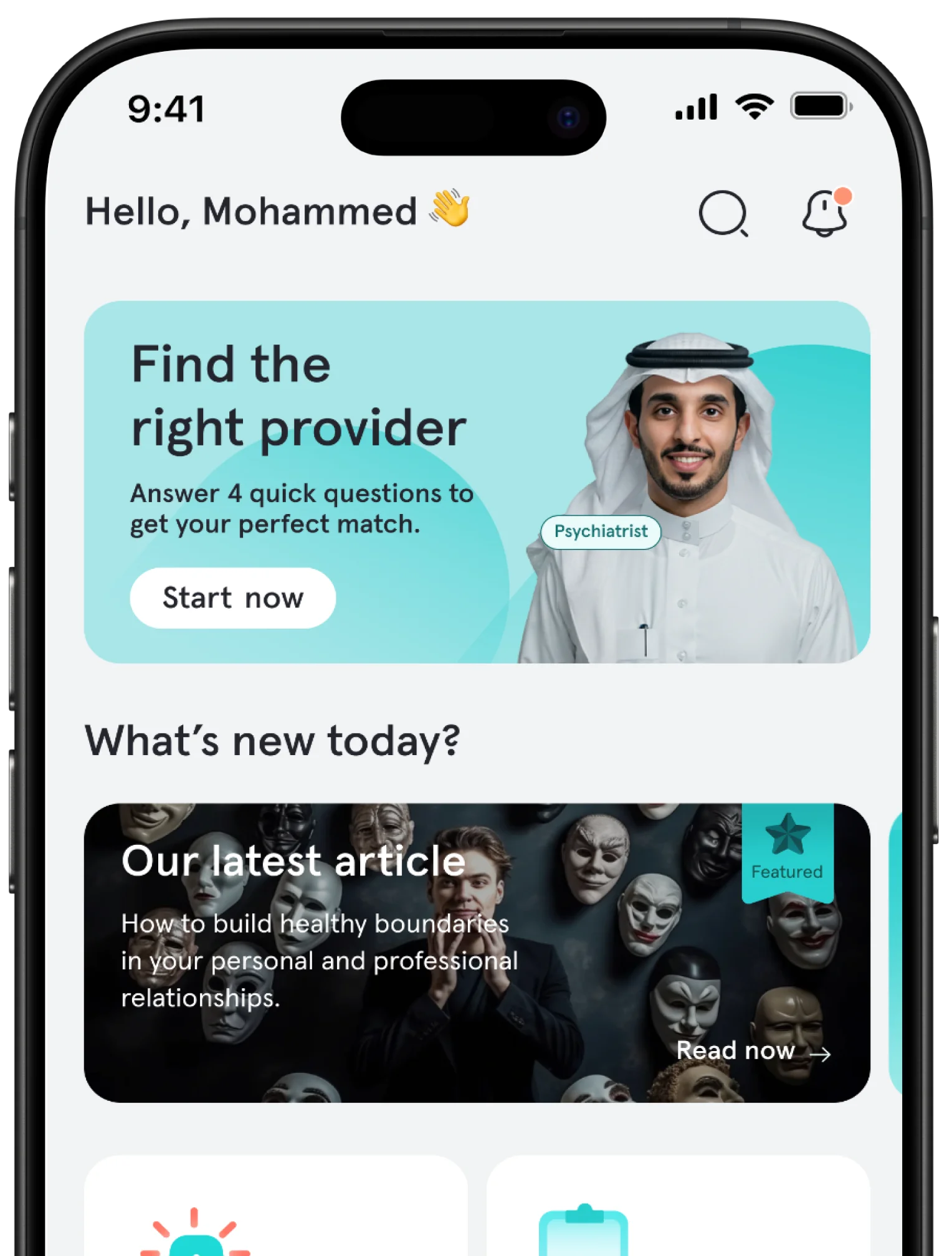
Using Tatmeen for a remote mental health consultation is simpler than it may seem, but the best start is not necessarily the first name you see in the provider list. In Tatmeen, there are three practical routes to care: smart matching when you are unsure who fits your need, urgent consultation when you need timely support, and browsing providers when you want to choose for yourself. After that, the flow is straightforward: create an account, choose a provider or matching route, select the session type, duration, and time, then join the consultation from inside the app.
Start With Your Need, Not the Booking Button
A common first-time mistake is treating the app like a directory of professionals. A better first question is: what do I want from this session? You may need a safe space to talk, a clearer understanding of what you are going through, support with a relationship, help with work burnout, panic symptoms, sleep issues, or a recurring feeling you cannot quite name.
That starting point matters because the app experience is most useful when your choice follows your real need. Instead of choosing randomly, use your current concern, preferred communication style, budget, and comfort level to narrow the path toward the provider who is most likely to fit.
Inside Tatmeen, You Have Three Routes, Not One
Smart matching is the best starting point if this is your first time using the platform or if you know you need help but are not sure which specialty fits. It saves you from comparing too many profiles before you have a clear direction.
Urgent consultation is useful when you need quick support and do not want to wait days for a scheduled appointment. This can help when the issue feels difficult to carry alone, while still not being an emergency that requires ambulance or emergency-room care.
Browsing providers is the better option when you already know your preferences: a provider of a specific gender, a certain language, experience with a particular topic, or a price range that suits you. In this route, comparison becomes part of the decision rather than a burden.
The practical rule is simple: if you are unsure, start with smart matching. If you feel under pressure now, start with urgent consultation. If you have clear preferences, browse provider profiles yourself.
How to Read a Provider Profile Before Booking
A provider profile should be treated as a decision tool, not just a short biography. Before booking, focus on five things:
Professional classification: check whether the provider is a physician, psychologist, therapist, or another licensed role, because prescribing authority and clinical scope are not the same for every profession.
Session format: some providers may offer text and audio sessions, while others may also offer video.
Language: choose a language in which you can describe sensitive details clearly.
Experience and sub-specialties: look for practical fit with your concern, such as anxiety, burnout, relationships, trauma, or sleep.
Ratings and volume: reviews are not the only factor, but they can help you understand how other users experienced the provider.
This point matters on the first booking. Do not choose someone only because they have the highest rating or the lowest price. Choose because your current concern sits within their scope, and because their session format is one you can actually use comfortably.
If the first session does not feel like a strong professional fit, do not treat that as failure. The therapeutic relationship matters, and the right fit sometimes takes more than one attempt.
The Booking Flow Is Simple; the Decision Matters
Once you have chosen the route or provider, the practical steps are fairly direct:
Create your account.
Choose a provider yourself or let the app match you.
Select the session type, duration, and appointment time.
Complete payment inside the platform.
Join the session from the app at the scheduled time.
It is also worth understanding appointment policies before you pay. Knowing the cancellation, refund, and technical-issue rules makes booking calmer because you are not guessing what happens if your schedule changes or a connection problem occurs.
Video Is Not Always the Best Session Type
Remote mental health care does not have to mean video every time. Text, audio, and video each serve a different kind of comfort and expression. The best format is not the one that looks most formal; it is the one that helps you be honest and consistent.
Text sessions can suit people who find direct speech difficult, need more time to organize their thoughts, or feel hesitant during a first conversation.
Audio sessions can suit people who want a human voice and real-time interaction without turning on a camera.
Video sessions can suit people who prefer an experience closer to an in-person conversation or who feel nonverbal cues will help.
The common mistake is choosing the format that seems the most serious on paper instead of the one you are most likely to complete. In real use, the session you can sustain is more valuable than the session that only sounds ideal.
After the Session Is Where Continuity Begins
A consultation should not be treated as an isolated event. The real benefit often appears after the appointment, when you return to the provider’s notes, reflect on what was discussed, and follow one practical recommendation before the next session. If your care plan includes assessments, homework, follow-up, reports, or medication questions, use those elements to keep momentum between appointments.
A useful rhythm is simple: do not close the app and wait passively for the next booking. Review the session summary, write down two or three observations, and apply one manageable step. Progress usually comes less from attendance alone and more from steady follow-through after attendance.
Privacy Is Part of Usability, Not Just a Promise
Many people hesitate before remote mental health care because of privacy concerns. That concern is reasonable. For any telehealth session, your own environment matters too: choose a private place, avoid public Wi-Fi when possible, use a password-protected device, and consider headphones so others cannot overhear sensitive details.
Privacy should make it easier to ask for help, but it should not lead you to hide clinically important information from the provider. The safer and clearer the setting feels, the easier it becomes to describe what is happening accurately.
When Not to Wait for an Appointment
Urgent consultation can be helpful when you need timely support, but it is not a substitute for emergency care. If there is immediate danger to you or someone else, suicidal thoughts with intent or a plan, or a serious loss of control, do not wait for an app appointment. Go to the nearest emergency department or contact local emergency support. In Saudi Arabia, the Ministry of Health’s 937 service is an important health-support route, but direct emergency care comes first when safety is at risk.
Final Thought
Using Tatmeen well does not begin with downloading the app; it begins with choosing the right path inside it. If this is your first time, smart matching may be the easiest start. If you already know what you need, read provider profiles carefully before booking. If what you need now is fast containment that cannot wait, an urgent consultation may be the closest practical step. Most importantly, do not let hesitation consume the time you could use to take a calmer, clearer first step.
Frequently Asked Questions
Do I need to know a provider’s name before using Tatmeen?
No. You can start with smart matching if you are unsure which provider fits your case, or browse providers if you prefer to choose yourself.
Can I use an alias inside Tatmeen?
Yes. You can use an alias as a privacy comfort feature, but still share clinically relevant information with the provider so the consultation can be useful and safe.
Do all providers offer video sessions?
Not necessarily. Check each provider profile for the session formats available, such as text, audio, or video.
Can I receive a report or prescription through Tatmeen?
Reports, care plans, digital prescriptions, and sick leave may be available when clinically needed. Prescribing depends on provider role and clinical scope, so choose the type of provider according to your goal.
What if I need to cancel the session?
Review the platform’s current appointment and refund policy before paying, especially the timing rules for cancellation and compensation in case of technical problems or provider absence.
When is my situation an emergency rather than a consultation request?
If there is immediate danger, suicidal thoughts with intent or means, or an acute loss of control, do not wait for a consultation. Seek emergency care or local crisis support immediately.
A writer and researcher specializing in psychiatry, she focuses on mental health and the human emotions we experience but cannot always find the words to name. She writes about us—about humanity and the human experience—and simplifies complex topics to offer content that helps us better understand ourselves and life, ultimately making us feel less alone.
Every Tatmeen article is reviewed by care providers licensed by the Saudi Commission for Health Specialties, so what you read is accurate and trustworthy.
This article builds understanding and does not replace a licensed care provider.
Need someone to talk to?
Tatmeen's licensed care providers are available around the clock, and the app's urgent consultation connects you with one within minutes.
Download Tatmeen to explore care providers and booking options.
Smart matchingFour quick questions suggest the right care provider
Urgent consultationTalk to an available care provider within minutes
Free psychological measuresMore than 20 tests to understand how you are doing
Scan to download
{"data":{"id":"85c2f23e-2d53-4f8c-9214-4225c6e0e183","slug":"how-to-use-tatmeen-online-therapy","arTitle":"كيف تستخدم تطبيق تطمين للحصول على استشارات نفسية عن بُعد؟","enTitle":"How to Use the Tatmeen App for Remote Mental Health Consultations","thumbnailAltText":"Smartphone therapy app in a calm living room with chat, calendar, and video icons","estimatedReadingTime":5,"likesCount":199,"writer":{"id":"3ab72b74-f26f-4337-9b47-3114b0f90de5","arBio":"كاتبة وباحثة متخصصة في مجال الطب النفسي، تهتم بموضوعات الصحة النفسية وبالمشاعر الإنسانية التي نختبرها ولا نجد دائمًا الكلمات لتسميتها. تكتب عنّا؛ عن الإنسان وتجربته، وتبسّط الموضوعات المعقّدة لتقدّم محتوى يساعدنا على فهم ذواتنا والحياة أكثر، ويجعلنا نشعر بأننا بوحدة أقل.","enBio":"A writer and researcher specializing in psychiatry, she focuses on mental health and the human emotions we experience but cannot always find the words to name. She writes about us—about humanity and the human experience—and simplifies complex topics to offer content that helps us better understand ourselves and life, ultimately making us feel less alone.","user":{"slug":"ayat-alnajar","arFullName":"آيات النجار","enFullName":"Ayat Al-Najjar","publicProfileImageUrl":"https://cdn.tatmeen.sa/public/profile-images/02384455-68fa-40b6-ad05-609fde65cafa/21b9a610dde5dfc6d37af110c23e9c7ab3946be080c281beb000debf4f7d31a6.webp","publicProfileImage96Url":"https://cdn.tatmeen.sa/public/profile-images/02384455-68fa-40b6-ad05-609fde65cafa/21b9a610dde5dfc6d37af110c23e9c7ab3946be080c281beb000debf4f7d31a6-w96.webp","publicProfileImage192Url":"https://cdn.tatmeen.sa/public/profile-images/02384455-68fa-40b6-ad05-609fde65cafa/21b9a610dde5dfc6d37af110c23e9c7ab3946be080c281beb000debf4f7d31a6-w192.webp"}},"arContent":"","enContent":"","productionDocument":{"headings":[{"id":"article-section-start-with-your-need-not-the-booking-button","text":"Start With Your Need, Not the Booking Button"},{"id":"article-section-inside-tatmeen-you-have-three-routes-not-one","text":"Inside Tatmeen, You Have Three Routes, Not One"},{"id":"article-section-how-to-read-a-provider-profile-before-booking","text":"How to Read a Provider Profile Before Booking"},{"id":"article-section-the-booking-flow-is-simple-the-decision-matters","text":"The Booking Flow Is Simple; the Decision Matters"},{"id":"article-section-video-is-not-always-the-best-session-type","text":"Video Is Not Always the Best Session Type"},{"id":"article-section-after-the-session-is-where-continuity-begins","text":"After the Session Is Where Continuity Begins"},{"id":"article-section-privacy-is-part-of-usability-not-just-a-promise","text":"Privacy Is Part of Usability, Not Just a Promise"},{"id":"article-section-when-not-to-wait-for-an-appointment","text":"When Not to Wait for an Appointment"},{"id":"article-section-final-thought","text":"Final Thought"}],"faqs":[{"question":"Do I need to know a provider’s name before using Tatmeen?","answer":"<p><span style=\"color:#000000\">No. You can start with smart matching if you are unsure which provider fits your case, or browse providers if you prefer to choose yourself.</span></p>"},{"question":"Can I use an alias inside Tatmeen?","answer":"<p><span style=\"color:#000000\">Yes. You can use an alias as a privacy comfort feature, but still share clinically relevant information with the provider so the consultation can be useful and safe.</span></p>"},{"question":"Do all providers offer video sessions?","answer":"<p><span style=\"color:#000000\">Not necessarily. Check each provider profile for the session formats available, such as text, audio, or video.</span></p>"},{"question":"Can I receive a report or prescription through Tatmeen?","answer":"<p><span style=\"color:#000000\">Reports, care plans, digital prescriptions, and sick leave may be available when clinically needed. Prescribing depends on provider role and clinical scope, so choose the type of provider according to your goal.</span></p>"},{"question":"What if I need to cancel the session?","answer":"<p><span style=\"color:#000000\">Review the platform’s current appointment and refund policy before paying, especially the timing rules for cancellation and compensation in case of technical problems or provider absence.</span></p>"},{"question":"When is my situation an emergency rather than a consultation request?","answer":"<p><span style=\"color:#000000\">If there is immediate danger, suicidal thoughts with intent or means, or an acute loss of control, do not wait for a consultation. Seek emergency care or local crisis support immediately.</span></p>"}],"beforeSourcesHtml":"","sources":[{"title":"Telemedicine","href":"https://www.moh.gov.sa/en/ministry/information-and-services/pages/telemedicine.aspx","hostname":"moh.gov.sa"},{"title":"937-Service Center Reports","href":"https://www.moh.gov.sa/en/ministry/statistics/pages/937servicereports.aspx","hostname":"moh.gov.sa"},{"title":"Professional classification requirements","href":"https://scfhs.org.sa/en/professional-classification-requirements","hostname":"scfhs.org.sa"},{"title":"How do I use telehealth for behavioral health care?","href":"https://telehealth.hhs.gov/patients/additional-resources/telehealth-and-behavioral-health","hostname":"telehealth.hhs.gov"},{"title":"How do I protect my data and privacy?","href":"https://telehealth.hhs.gov/patients/telehealth-privacy-for-patients","hostname":"telehealth.hhs.gov"},{"title":"Getting Mental Health Support Virtually","href":"https://www.nimh.nih.gov/health/publications/what-is-telemental-health","hostname":"nimh.nih.gov"},{"title":"Suicide","href":"https://www.who.int/news-room/questions-and-answers/item/suicide","hostname":"who.int"}],"afterSourcesHtml":"","blocks":[{"type":"html","html":"<p><span style=\"color:#000000\">Using Tatmeen for a remote mental health consultation is simpler than it may seem, but the best start is not necessarily the first name you see in the provider list. In Tatmeen, there are three practical routes to care: smart matching when you are unsure who fits your need, urgent consultation when you need timely support, and browsing providers when you want to choose for yourself. After that, the flow is straightforward: create an account, choose a provider or matching route, select the session type, duration, and time, then join the consultation from inside the app.</span></p><h2 id=\"article-section-start-with-your-need-not-the-booking-button\" data-toc-heading tabindex=\"-1\"><span id=\"start-with-your-need-not-the-booking-button-1\" aria-hidden=\"true\"></span><span style=\"color:#000000\"><strong>Start With Your Need, Not the Booking Button</strong></span></h2><p><span style=\"color:#000000\">A common first-time mistake is treating the app like a directory of professionals. A better first question is: what do I want from this session? You may need a safe space to talk, a clearer understanding of what you are going through, support with a relationship, help with work burnout, panic symptoms, sleep issues, or a recurring feeling you cannot quite name.</span></p><p><span style=\"color:#000000\">That starting point matters because the app experience is most useful when your choice follows your real need. Instead of choosing randomly, use your current concern, preferred communication style, budget, and comfort level to narrow the path toward the provider who is most likely to fit.</span></p><h2 id=\"article-section-inside-tatmeen-you-have-three-routes-not-one\" data-toc-heading tabindex=\"-1\"><span id=\"inside-tatmeen-you-have-three-routes-not-one-2\" aria-hidden=\"true\"></span><span style=\"color:#000000\"><strong>Inside Tatmeen, You Have Three Routes, Not One</strong></span></h2><p><span style=\"color:#000000\">Smart matching is the best starting point if this is your first time using the platform or if you know you need help but are not sure which specialty fits. It saves you from comparing too many profiles before you have a clear direction.</span></p><p><span style=\"color:#000000\">Urgent consultation is useful when you need quick support and do not want to wait days for a scheduled appointment. This can help when the issue feels difficult to carry alone, while still not being an emergency that requires ambulance or emergency-room care.</span></p><p><span style=\"color:#000000\">Browsing providers is the better option when you already know your preferences: a provider of a specific gender, a certain language, experience with a particular topic, or a price range that suits you. In this route, comparison becomes part of the decision rather than a burden.</span></p><p><span style=\"color:#000000\">The practical rule is simple: if you are unsure, start with smart matching. If you feel under pressure now, start with urgent consultation. If you have clear preferences, browse provider profiles yourself.</span></p><h2 id=\"article-section-how-to-read-a-provider-profile-before-booking\" data-toc-heading tabindex=\"-1\"><span id=\"how-to-read-a-provider-profile-before-booking-3\" aria-hidden=\"true\"></span><span style=\"color:#000000\"><strong>How to Read a Provider Profile Before Booking</strong></span></h2><p><span style=\"color:#000000\">A provider profile should be treated as a decision tool, not just a short biography. Before booking, focus on five things:</span></p><ul><li><p><span style=\"color:#000000\">Professional classification: check whether the provider is a physician, psychologist, therapist, or another licensed role, because prescribing authority and clinical scope are not the same for every profession.</span></p></li><li><p><span style=\"color:#000000\">Session format: some providers may offer text and audio sessions, while others may also offer video.</span></p></li><li><p><span style=\"color:#000000\">Language: choose a language in which you can describe sensitive details clearly.</span></p></li><li><p><span style=\"color:#000000\">Experience and sub-specialties: look for practical fit with your concern, such as anxiety, burnout, relationships, trauma, or sleep.</span></p></li><li><p><span style=\"color:#000000\">Ratings and volume: reviews are not the only factor, but they can help you understand how other users experienced the provider.</span></p></li></ul><p><span style=\"color:#000000\">This point matters on the first booking. Do not choose someone only because they have the highest rating or the lowest price. Choose because your current concern sits within their scope, and because their session format is one you can actually use comfortably.</span></p><p><span style=\"color:#000000\">If the first session does not feel like a strong professional fit, do not treat that as failure. The therapeutic relationship matters, and the right fit sometimes takes more than one attempt.</span></p><h2 id=\"article-section-the-booking-flow-is-simple-the-decision-matters\" data-toc-heading tabindex=\"-1\"><span id=\"the-booking-flow-is-simple-the-decision-matters-4\" aria-hidden=\"true\"></span><span style=\"color:#000000\"><strong>The Booking Flow Is Simple; the Decision Matters</strong></span></h2><p><span style=\"color:#000000\">Once you have chosen the route or provider, the practical steps are fairly direct:</span></p><ul><li><p><span style=\"color:#000000\">Create your account.</span></p></li><li><p><span style=\"color:#000000\">Choose a provider yourself or let the app match you.</span></p></li><li><p><span style=\"color:#000000\">Select the session type, duration, and appointment time.</span></p></li><li><p><span style=\"color:#000000\">Complete payment inside the platform.</span></p></li><li><p><span style=\"color:#000000\">Join the session from the app at the scheduled time.</span></p></li></ul><p><span style=\"color:#000000\">It is also worth understanding appointment policies before you pay. Knowing the cancellation, refund, and technical-issue rules makes booking calmer because you are not guessing what happens if your schedule changes or a connection problem occurs.</span></p><h2 id=\"article-section-video-is-not-always-the-best-session-type\" data-toc-heading tabindex=\"-1\"><span id=\"video-is-not-always-the-best-session-type-5\" aria-hidden=\"true\"></span><span style=\"color:#000000\"><strong>Video Is Not Always the Best Session Type</strong></span></h2><p><span style=\"color:#000000\">Remote mental health care does not have to mean video every time. Text, audio, and video each serve a different kind of comfort and expression. The best format is not the one that looks most formal; it is the one that helps you be honest and consistent.</span></p><ul><li><p><span style=\"color:#000000\">Text sessions can suit people who find direct speech difficult, need more time to organize their thoughts, or feel hesitant during a first conversation.</span></p></li><li><p><span style=\"color:#000000\">Audio sessions can suit people who want a human voice and real-time interaction without turning on a camera.</span></p></li><li><p><span style=\"color:#000000\">Video sessions can suit people who prefer an experience closer to an in-person conversation or who feel nonverbal cues will help.</span></p></li></ul><p><span style=\"color:#000000\">The common mistake is choosing the format that seems the most serious on paper instead of the one you are most likely to complete. In real use, the session you can sustain is more valuable than the session that only sounds ideal.</span></p><h2 id=\"article-section-after-the-session-is-where-continuity-begins\" data-toc-heading tabindex=\"-1\"><span id=\"after-the-session-is-where-continuity-begins-6\" aria-hidden=\"true\"></span><span style=\"color:#000000\"><strong>After the Session Is Where Continuity Begins</strong></span></h2><p><span style=\"color:#000000\">A consultation should not be treated as an isolated event. The real benefit often appears after the appointment, when you return to the provider’s notes, reflect on what was discussed, and follow one practical recommendation before the next session. If your care plan includes assessments, homework, follow-up, reports, or medication questions, use those elements to keep momentum between appointments.</span></p><p><span style=\"color:#000000\">A useful rhythm is simple: do not close the app and wait passively for the next booking. Review the session summary, write down two or three observations, and apply one manageable step. Progress usually comes less from attendance alone and more from steady follow-through after attendance.</span></p><h2 id=\"article-section-privacy-is-part-of-usability-not-just-a-promise\" data-toc-heading tabindex=\"-1\"><span id=\"privacy-is-part-of-usability-not-just-a-promise-7\" aria-hidden=\"true\"></span><span style=\"color:#000000\"><strong>Privacy Is Part of Usability, Not Just a Promise</strong></span></h2><p><span style=\"color:#000000\">Many people hesitate before remote mental health care because of privacy concerns. That concern is reasonable. For any telehealth session, your own environment matters too: choose a private place, avoid public Wi-Fi when possible, use a password-protected device, and consider headphones so others cannot overhear sensitive details.</span></p><p><span style=\"color:#000000\">Privacy should make it easier to ask for help, but it should not lead you to hide clinically important information from the provider. The safer and clearer the setting feels, the easier it becomes to describe what is happening accurately.</span></p><h2 id=\"article-section-when-not-to-wait-for-an-appointment\" data-toc-heading tabindex=\"-1\"><span id=\"when-not-to-wait-for-an-appointment-8\" aria-hidden=\"true\"></span><span style=\"color:#000000\"><strong>When Not to Wait for an Appointment</strong></span></h2><p><span style=\"color:#000000\">Urgent consultation can be helpful when you need timely support, but it is not a substitute for emergency care. If there is immediate danger to you or someone else, suicidal thoughts with intent or a plan, or a serious loss of control, do not wait for an app appointment. Go to the nearest emergency department or contact local emergency support. In Saudi Arabia, the Ministry of Health’s 937 service is an important health-support route, but direct emergency care comes first when safety is at risk.</span></p><h2 id=\"article-section-final-thought\" data-toc-heading tabindex=\"-1\"><span id=\"final-thought-9\" aria-hidden=\"true\"></span><span style=\"color:#000000\"><strong>Final Thought</strong></span></h2><p><span style=\"color:#000000\">Using Tatmeen well does not begin with downloading the app; it begins with choosing the right path inside it. If this is your first time, smart matching may be the easiest start. If you already know what you need, read provider profiles carefully before booking. If what you need now is fast containment that cannot wait, an urgent consultation may be the closest practical step. Most importantly, do not let hesitation consume the time you could use to take a calmer, clearer first step.</span></p>"}],"inlineCtaSignatures":[],"_experienceAliases":{"v":1,"fields":["html","bodyHtml"],"faqs":[0,1,2,3,4,5]}},"createdAt":"2026-06-23T21:00:00.000Z","updatedAt":"2026-06-26T14:14:43.341Z","disorderGroups":[{"id":"1e82772d-a1a7-4d29-b475-be9d6b67ae02","slug":"common-mental-issues","arName":"اضطرابات نفسية شائعة","enName":"Common Mental Issues"}],"reviewer":{"arFullName":"فريق تطمين","enFullName":"Tatmeen team","slug":"tatmeen-team","kind":"organization"},"productionArticle":true,"promotionAllowed":true,"preparedCover":{"src":"https://cdn.tatmeen.sa/public/article-lcp/article-lcp-v2/sha256-6f4618b1e344c73f39ea2e2985a673570f969ed37668e436e9d1da885c86fdb3/800-9487f65556105192168031a47f47d4c9ededcde20ef62148475daf3a12d34832.avif","fallback":"https://cdn.tatmeen.sa/public/article-lcp/article-lcp-v2/sha256-6f4618b1e344c73f39ea2e2985a673570f969ed37668e436e9d1da885c86fdb3/800-f4742c2f26f9a4150434c798f2645e86bc5e1e0928fd46d6a4a2410611ecdee0.webp","directUrl":"https://cdn.tatmeen.sa/blog-cover/Tatmeen-1782321108360.webp","isGolden":true,"avifSrcset":"https://cdn.tatmeen.sa/public/article-lcp/article-lcp-v2/sha256-6f4618b1e344c73f39ea2e2985a673570f969ed37668e436e9d1da885c86fdb3/400-7903e6d0e1c27ebe0611765e659dc47a79709e793ac3159fe4104f1377198fcb.avif 400w, https://cdn.tatmeen.sa/public/article-lcp/article-lcp-v2/sha256-6f4618b1e344c73f39ea2e2985a673570f969ed37668e436e9d1da885c86fdb3/640-1e930707199a94d5adbf572536c36105113c5f957bff7b6b73e76490265bde02.avif 640w, https://cdn.tatmeen.sa/public/article-lcp/article-lcp-v2/sha256-6f4618b1e344c73f39ea2e2985a673570f969ed37668e436e9d1da885c86fdb3/800-9487f65556105192168031a47f47d4c9ededcde20ef62148475daf3a12d34832.avif 800w, https://cdn.tatmeen.sa/public/article-lcp/article-lcp-v2/sha256-6f4618b1e344c73f39ea2e2985a673570f969ed37668e436e9d1da885c86fdb3/1200-786ad66696803b790422a43dc5af6cc146e46317e02923d12663e756153e5d57.avif 1200w","webpSrcset":"https://cdn.tatmeen.sa/public/article-lcp/article-lcp-v2/sha256-6f4618b1e344c73f39ea2e2985a673570f969ed37668e436e9d1da885c86fdb3/400-1235405635fb3251e93630e471770a200f08469ad4670a203665df47cad1c759.webp 400w, https://cdn.tatmeen.sa/public/article-lcp/article-lcp-v2/sha256-6f4618b1e344c73f39ea2e2985a673570f969ed37668e436e9d1da885c86fdb3/640-8017cb9f823dab9834f99d82b98dba26f2d4f2d95a3d77c554c4a43a60d0c93a.webp 640w, https://cdn.tatmeen.sa/public/article-lcp/article-lcp-v2/sha256-6f4618b1e344c73f39ea2e2985a673570f969ed37668e436e9d1da885c86fdb3/800-f4742c2f26f9a4150434c798f2645e86bc5e1e0928fd46d6a4a2410611ecdee0.webp 800w, https://cdn.tatmeen.sa/public/article-lcp/article-lcp-v2/sha256-6f4618b1e344c73f39ea2e2985a673570f969ed37668e436e9d1da885c86fdb3/1200-dd83b6baae5d8caad2c52d5c7bd4a17d8717fa42220c62c66c153ac1176afac5.webp 1200w","phoneAvifSrcset":"https://cdn.tatmeen.sa/public/article-lcp/article-lcp-v2/sha256-6f4618b1e344c73f39ea2e2985a673570f969ed37668e436e9d1da885c86fdb3/400-7903e6d0e1c27ebe0611765e659dc47a79709e793ac3159fe4104f1377198fcb.avif 400w, https://cdn.tatmeen.sa/public/article-lcp/article-lcp-v2/sha256-6f4618b1e344c73f39ea2e2985a673570f969ed37668e436e9d1da885c86fdb3/640-1e930707199a94d5adbf572536c36105113c5f957bff7b6b73e76490265bde02.avif 640w, https://cdn.tatmeen.sa/public/article-lcp/article-lcp-v2/sha256-6f4618b1e344c73f39ea2e2985a673570f969ed37668e436e9d1da885c86fdb3/800-9487f65556105192168031a47f47d4c9ededcde20ef62148475daf3a12d34832.avif 800w","phoneWebpSrcset":"https://cdn.tatmeen.sa/public/article-lcp/article-lcp-v2/sha256-6f4618b1e344c73f39ea2e2985a673570f969ed37668e436e9d1da885c86fdb3/400-1235405635fb3251e93630e471770a200f08469ad4670a203665df47cad1c759.webp 400w, https://cdn.tatmeen.sa/public/article-lcp/article-lcp-v2/sha256-6f4618b1e344c73f39ea2e2985a673570f969ed37668e436e9d1da885c86fdb3/640-8017cb9f823dab9834f99d82b98dba26f2d4f2d95a3d77c554c4a43a60d0c93a.webp 640w, https://cdn.tatmeen.sa/public/article-lcp/article-lcp-v2/sha256-6f4618b1e344c73f39ea2e2985a673570f969ed37668e436e9d1da885c86fdb3/800-f4742c2f26f9a4150434c798f2645e86bc5e1e0928fd46d6a4a2410611ecdee0.webp 800w","width":800,"height":450},"previewTaxonomy":{"groups":[{"id":"1e82772d-a1a7-4d29-b475-be9d6b67ae02","slug":"common-mental-issues","arName":"اضطرابات نفسية شائعة","enName":"Common Mental Issues"}],"topics":[],"tags":[{"id":"0a7fb6ee-560f-4ee0-b5f5-a8af3b1bb1da","slug":"tatmeen","arName":"تطمين","enName":"Tatmeen"},{"id":"300cd66c-9540-4ed3-8eae-47386be32d60","slug":"digital-health-telehealth","arName":"الصحة الرقمية والعلاج عن بُعد","enName":"Digital Health & Telehealth"},{"id":"8f632a07-06ba-44f3-afe9-d7cef3e09698","slug":"product-howto","arName":"دليل المنتج / كيفية الاستخدام","enName":"Product Explainer / How-To-Use"}]},"previewProviderRecommendations":[{"id":"6866c238-0223-4d20-b182-6bf8929dccca","slug":"bushra-alluhaibi-4189","arFullName":"بشرى اللهيبي","enFullName":"Bushra Alluhaibi","publicProfileImageUrl":"","publicProfileImage96Url":"","publicProfileImage192Url":"","specialization":{"arName":"أخصائي نفسي","enName":"Psychologist"},"profileImageUrl":"","experienceYears":12,"consultantInfo":{"averageRating":{"average":0},"specialization":{"arGeneralName":"أخصائي نفسي","enGeneralName":"Psychologist"}}},{"id":"23ba62b8-9679-46a2-9439-b2801cafc59b","slug":"dr-mohammed-alanazi-4132","arFullName":"د. محمد العنزي","enFullName":"Dr. Mohammed ALANAZI","publicProfileImageUrl":"https://cdn.tatmeen.sa/public/profile-images/23ba62b8-9679-46a2-9439-b2801cafc59b/233e70d98cd910633553abf60e5ee8dd305797b64c4172746ab379f3b91a1461.webp","publicProfileImage96Url":"https://cdn.tatmeen.sa/public/profile-images/23ba62b8-9679-46a2-9439-b2801cafc59b/233e70d98cd910633553abf60e5ee8dd305797b64c4172746ab379f3b91a1461-w96.webp","publicProfileImage192Url":"https://cdn.tatmeen.sa/public/profile-images/23ba62b8-9679-46a2-9439-b2801cafc59b/233e70d98cd910633553abf60e5ee8dd305797b64c4172746ab379f3b91a1461-w192.webp","specialization":{"arName":"طبيب أسرة","enName":"Family Physician"},"profileImageUrl":"https://cdn.tatmeen.sa/public/profile-images/23ba62b8-9679-46a2-9439-b2801cafc59b/233e70d98cd910633553abf60e5ee8dd305797b64c4172746ab379f3b91a1461-w192.webp","experienceYears":3,"consultantInfo":{"averageRating":{"average":0},"specialization":{"arGeneralName":"طبيب أسرة","enGeneralName":"Family Physician"}}},{"id":"4bcf0531-d58c-4284-aeed-b2563c966ee3","slug":"dr-sultan-albalawi-9701","arFullName":"د. سلطان البلوي","enFullName":"Dr. Sultan Albalawi","publicProfileImageUrl":"https://cdn.tatmeen.sa/public/profile-images/4bcf0531-d58c-4284-aeed-b2563c966ee3/7038797eec8398a3d17eebf66394b26366409d9a9faece56515311203b0600b2.webp","publicProfileImage96Url":"https://cdn.tatmeen.sa/public/profile-images/4bcf0531-d58c-4284-aeed-b2563c966ee3/7038797eec8398a3d17eebf66394b26366409d9a9faece56515311203b0600b2-w96.webp","publicProfileImage192Url":"https://cdn.tatmeen.sa/public/profile-images/4bcf0531-d58c-4284-aeed-b2563c966ee3/7038797eec8398a3d17eebf66394b26366409d9a9faece56515311203b0600b2-w192.webp","specialization":{"arName":"طبيب أسرة","enName":"Family Physician"},"profileImageUrl":"https://cdn.tatmeen.sa/public/profile-images/4bcf0531-d58c-4284-aeed-b2563c966ee3/7038797eec8398a3d17eebf66394b26366409d9a9faece56515311203b0600b2-w192.webp","experienceYears":3,"consultantInfo":{"averageRating":{"average":0},"specialization":{"arGeneralName":"طبيب أسرة","enGeneralName":"Family Physician"}}}],"previewCareProviders":[{"id":"09364052-c2a9-4c52-9717-7ce2093b8d0a","slug":"kholoud-alharbi-5221","arFullName":"خلود الحربي","enFullName":"Kholoud Alharbi","publicProfileImageUrl":"https://cdn.tatmeen.sa/public/profile-images/09364052-c2a9-4c52-9717-7ce2093b8d0a/4a0aeb81619e351b77f4323e3605a0a00acc7ca3c82ee7cc5ca2c9e8ef716049.webp","publicProfileImage96Url":"https://cdn.tatmeen.sa/public/profile-images/09364052-c2a9-4c52-9717-7ce2093b8d0a/4a0aeb81619e351b77f4323e3605a0a00acc7ca3c82ee7cc5ca2c9e8ef716049-w96.webp","publicProfileImage192Url":"https://cdn.tatmeen.sa/public/profile-images/09364052-c2a9-4c52-9717-7ce2093b8d0a/4a0aeb81619e351b77f4323e3605a0a00acc7ca3c82ee7cc5ca2c9e8ef716049-w192.webp","gender":"FEMALE","specialization":{"arName":"أخصائي نفسي","enName":"Psychologist"}},{"id":"6f037535-1dca-4b50-a8b2-5974b7323286","slug":"salah-althobaiti-9053","arFullName":"صلاح الثبيتي","enFullName":"Salah Althobaiti","publicProfileImageUrl":"https://cdn.tatmeen.sa/public/profile-images/6f037535-1dca-4b50-a8b2-5974b7323286/35b6bd7fad9b1e004c1835803eb9c1b56dcacd380685ec8bff141f0fb888005c.webp","publicProfileImage96Url":"https://cdn.tatmeen.sa/public/profile-images/6f037535-1dca-4b50-a8b2-5974b7323286/35b6bd7fad9b1e004c1835803eb9c1b56dcacd380685ec8bff141f0fb888005c-w96.webp","publicProfileImage192Url":"https://cdn.tatmeen.sa/public/profile-images/6f037535-1dca-4b50-a8b2-5974b7323286/35b6bd7fad9b1e004c1835803eb9c1b56dcacd380685ec8bff141f0fb888005c-w192.webp","gender":"MALE","specialization":{"arName":"أخصائي نفسي","enName":"Psychologist"}},{"id":"3cc806e8-616b-4884-9f21-a75b378580a2","slug":"aisha-al-hashim-8667","arFullName":"عائشة ال هاشم","enFullName":"Aisha Al Hashim","publicProfileImageUrl":"https://cdn.tatmeen.sa/public/profile-images/3cc806e8-616b-4884-9f21-a75b378580a2/27f523d03be4dcfa1f6a79f70c1773887434e698990d214cd990caec56a44798.webp","publicProfileImage96Url":"https://cdn.tatmeen.sa/public/profile-images/3cc806e8-616b-4884-9f21-a75b378580a2/27f523d03be4dcfa1f6a79f70c1773887434e698990d214cd990caec56a44798-w96.webp","publicProfileImage192Url":"https://cdn.tatmeen.sa/public/profile-images/3cc806e8-616b-4884-9f21-a75b378580a2/27f523d03be4dcfa1f6a79f70c1773887434e698990d214cd990caec56a44798-w192.webp","gender":"FEMALE","specialization":{"arName":"أخصائي نفسي","enName":"Psychologist"}},{"id":"db2ce1a0-9325-4471-b7ce-eb2e811c30a3","slug":"amer-qutub-2441","arFullName":"عامر قطب","enFullName":"Amer Qutub","publicProfileImageUrl":"https://cdn.tatmeen.sa/public/profile-images/db2ce1a0-9325-4471-b7ce-eb2e811c30a3/80580f99bfd7fe2b2a9cf8eed73ab532f5086d1efe053b0aa57358c1ce004261.webp","publicProfileImage96Url":"https://cdn.tatmeen.sa/public/profile-images/db2ce1a0-9325-4471-b7ce-eb2e811c30a3/80580f99bfd7fe2b2a9cf8eed73ab532f5086d1efe053b0aa57358c1ce004261-w96.webp","publicProfileImage192Url":"https://cdn.tatmeen.sa/public/profile-images/db2ce1a0-9325-4471-b7ce-eb2e811c30a3/80580f99bfd7fe2b2a9cf8eed73ab532f5086d1efe053b0aa57358c1ce004261-w192.webp","gender":"MALE","specialization":{"arName":"أخصائي نفسي","enName":"Psychologist"}},{"id":"94765496-dbdf-4631-a01b-7df5f788668d","slug":"abdullrahman-alhamoudi-3045","arFullName":"عبدالرحمن الحمودي","enFullName":"Abdulrahman Alhamoudi","publicProfileImageUrl":"https://cdn.tatmeen.sa/public/profile-images/94765496-dbdf-4631-a01b-7df5f788668d/2d49f6b6493c564afb6f50b6c3634231dff3a5cf8353acfab393d1b2a88037d1.webp","publicProfileImage96Url":"https://cdn.tatmeen.sa/public/profile-images/94765496-dbdf-4631-a01b-7df5f788668d/2d49f6b6493c564afb6f50b6c3634231dff3a5cf8353acfab393d1b2a88037d1-w96.webp","publicProfileImage192Url":"https://cdn.tatmeen.sa/public/profile-images/94765496-dbdf-4631-a01b-7df5f788668d/2d49f6b6493c564afb6f50b6c3634231dff3a5cf8353acfab393d1b2a88037d1-w192.webp","gender":"MALE","specialization":{"arName":"أخصائي نفسي","enName":"Psychologist"}},{"id":"618dba89-5b70-4b46-8304-741b7ac8ecd3","slug":"abdullah-mari-1311","arFullName":"عبدالله مرعي","enFullName":"Abdullah Mari","publicProfileImageUrl":"https://cdn.tatmeen.sa/public/profile-images/618dba89-5b70-4b46-8304-741b7ac8ecd3/6b4a3bfb59f8a304ca79083b32859b46baad2e1d692974a47c02c1f66bd11129.webp","publicProfileImage96Url":"https://cdn.tatmeen.sa/public/profile-images/618dba89-5b70-4b46-8304-741b7ac8ecd3/6b4a3bfb59f8a304ca79083b32859b46baad2e1d692974a47c02c1f66bd11129-w96.webp","publicProfileImage192Url":"https://cdn.tatmeen.sa/public/profile-images/618dba89-5b70-4b46-8304-741b7ac8ecd3/6b4a3bfb59f8a304ca79083b32859b46baad2e1d692974a47c02c1f66bd11129-w192.webp","gender":"MALE","specialization":{"arName":"أخصائي نفسي","enName":"Psychologist"}},{"id":"3b50a5d5-e795-407f-8676-fd7f0e1bb7a0","slug":"abdulaziz-bin-hudayan-4940","arFullName":"عبدالعزيز بن هديان","enFullName":"Abdulaziz Bin Hudayan","publicProfileImageUrl":"https://cdn.tatmeen.sa/public/profile-images/3b50a5d5-e795-407f-8676-fd7f0e1bb7a0/710ff0fe1fb00cdb5042092e27b7910b480a439b02251ecded62d7758eefce95.webp","publicProfileImage96Url":"https://cdn.tatmeen.sa/public/profile-images/3b50a5d5-e795-407f-8676-fd7f0e1bb7a0/710ff0fe1fb00cdb5042092e27b7910b480a439b02251ecded62d7758eefce95-w96.webp","publicProfileImage192Url":"https://cdn.tatmeen.sa/public/profile-images/3b50a5d5-e795-407f-8676-fd7f0e1bb7a0/710ff0fe1fb00cdb5042092e27b7910b480a439b02251ecded62d7758eefce95-w192.webp","gender":"MALE","specialization":{"arName":"أخصائي نفسي","enName":"Psychologist"}}],"previewDownload":{"href":"/download","title":{"ar":"خطوة واحدة لأجلك، ابدأ الآن","en":"One step for you, start now"},"description":{"ar":"حمّل تطبيق تطمين لاستكشاف مقدمي الرعاية وخيارات الحجز.","en":"Download Tatmeen to explore care providers and booking options."},"posterSrc":"/images/home/cta-ar-new-1.webp","videoSrc":"/images/home/cta-ar-new-1.mp4","videoPosterSrc":"/images/home/cta-ar-new-1.webp","videoPosterEnSrc":"/images/home/cta-en-new-1.webp","videoType":"video/mp4","appStoreHref":"https://apps.apple.com/us/app/tatmeen-%D8%AA%D8%B7%D9%85%D9%8A%D9%86/id6473836983","googlePlayHref":"https://play.google.com/store/apps/details?id=com.TatmeenApp.user&hl=en"},"previewRelatedArticles":[{"id":"31fb0aba-6e63-4c2a-b5d9-28799c2bdf26","slug":"blue-horse-symbol-of-freedom-in-psychiatry","route":"/blog/blue-horse-symbol-of-freedom-in-psychiatry/","title":{"ar":"الحصان الأزرق في الطب النفسي: حكاية حرية تُسمَع","en":"The Blue Horse in Psychiatry: A Story of Freedom That Is Heard"},"image":"https://cdn.tatmeen.sa/public/article-lcp/article-lcp-v2/sha256-fb43250d88ae1ebe50bb2ad77ed28571e4329c72cac2312112cfd8439ea025b6/800-3e28077ef260db4606306174e079f501f1b1d12c8ea1cbcf4ed35beb1a2302dc.webp","directImageFallback":"https://cdn.tatmeen.sa/blog-cover/Tatmeen-1783194572797.webp","arThumbnailAltText":"Blue horse on cliff at sunset inside a woman's silhouette with birds flying over the sea","thumbnailAltText":"Blue horse on cliff at sunset inside a woman's silhouette with birds flying over the sea","topic":{"label":{"ar":"اضطرابات نفسية شائعة","en":"Common Mental Issues"}},"readingTimeMinutes":5},{"id":"cbe2e28d-11b9-4cbe-918f-0cc3b0d3a6ef","slug":"tatmeen-vision-2030-mental-health","route":"/blog/tatmeen-vision-2030-mental-health/","title":{"ar":"تجربة عربية محلية لمستقبل العلاج النفسي: لماذا ينسجم تطمين مع رؤية 2030؟","en":"A Local Arabic Experience for the Future of Mental Health Care: Why Tatmeen Fits"},"image":"https://cdn.tatmeen.sa/public/article-lcp/article-lcp-v2/sha256-0895b168ab817cd67296a1eb6a04d2121940b105ed1bc906c73bc268e0a8d0a0/800-9c829a653b5daec869e34a688770d05c262f1dfb8089fa4dd1109c0208c411f7.webp","directImageFallback":"https://cdn.tatmeen.sa/blog-cover/Tatmeen-1782319724380.webp","arThumbnailAltText":"Teal infographic with Tatmeen logo, connected icons, and Vision 2030 branding on gradient background","thumbnailAltText":"Teal infographic with Tatmeen logo, connected icons, and Vision 2030 branding on gradient background","topic":{"label":{"ar":"اضطرابات نفسية شائعة","en":"Common Mental Issues"}},"readingTimeMinutes":5},{"id":"f3b4167d-6d94-41c8-87b5-24bd08478da6","slug":"The-role-of-a-psychiatrist-in-a-patients-life","route":"/blog/The-role-of-a-psychiatrist-in-a-patients-life/","title":{"ar":"دور الطبيب النفسي في حياة المريض","en":"The Psychiatrist’s Role in a Patient’s Life"},"image":"https://cdn.tatmeen.sa/public/article-lcp/article-lcp-v2/sha256-8cf9a7f0315242bff52bff8979cf4e1d9da396d810f9d8cacdc74f8475c0e686/750-364db1f351415151d66dbeec5dc96c232821eab25a7c0ac7279338d774d6c91b.webp","directImageFallback":"https://cdn.tatmeen.sa/blog-cover/1704820622054-Tatmeen-img-396","arThumbnailAltText":"A person with a clipboard faces another person reclining on a couch","thumbnailAltText":"A person with a clipboard faces another person reclining on a couch","topic":{"label":{"ar":"اضطرابات نفسية شائعة","en":"Common Mental Issues"}},"readingTimeMinutes":5},{"id":"b0b88730-efe5-41c8-86a1-8db92b901b4a","slug":"what_is_mental_health","route":"/blog/what_is_mental_health/","title":{"ar":"ما هي الصحة النفسية؟","en":"What Is Mental Health?"},"image":"https://cdn.tatmeen.sa/public/article-lcp/article-lcp-v2/sha256-292bc42b173ff207f7ebaafe0bf418c5e8b0861d8bc4e57dab87e2b75b85f11e/300-3253e99c3fb7ff4565ee5fbd040e87df03f449ed754f1b280ae5ec785d81b03c.webp","directImageFallback":"https://cdn.tatmeen.sa/blog-cover/1704124524981-Mental-Health-Vector-300x250.jpeg","arThumbnailAltText":"Stylized person watering leafy plants growing from an open head","thumbnailAltText":"Stylized person watering leafy plants growing from an open head","topic":{"label":{"ar":"اضطرابات نفسية شائعة","en":"Common Mental Issues"}},"readingTimeMinutes":5}],"previewRelatedReadStates":{}},"locale":"en","device":"desktop","path":"/en/blog/how-to-use-tatmeen-online-therapy/","readingControls":false,"config":{"public":{"BUCKET_URL":"https://cdn.tatmeen.sa/","APP_BASE_URL":"https://tatmeen.sa","intercomAppId":"ppcnu9e3"}}}